UniText — Complete Text Engine for Unity with Styles and Effects, Animations and Emoji


UniText is a Complete Text Engine for Unity that supports All Languages, Emojis, Styles, and Markup. Production-Grade, Extensible, High-Performance, Built on Industry Standards. Unlimited Variations of Styles you can achieve with it — creative possibilities will never end.

UniText was released on April 1, 2026. In just 5 months, it has built a Community of 200+ Indie Devs and 10 Studios. The Publisher has No Plans to Slow Down in Investing Time into Foundational Development for the Unity Game Engine. Most TextMesh Pro (TMP) and UI Toolkit limitations are addressed here — why are you still using them?
Note: This post is sponsored by Light Side LLC (the developer of the asset).
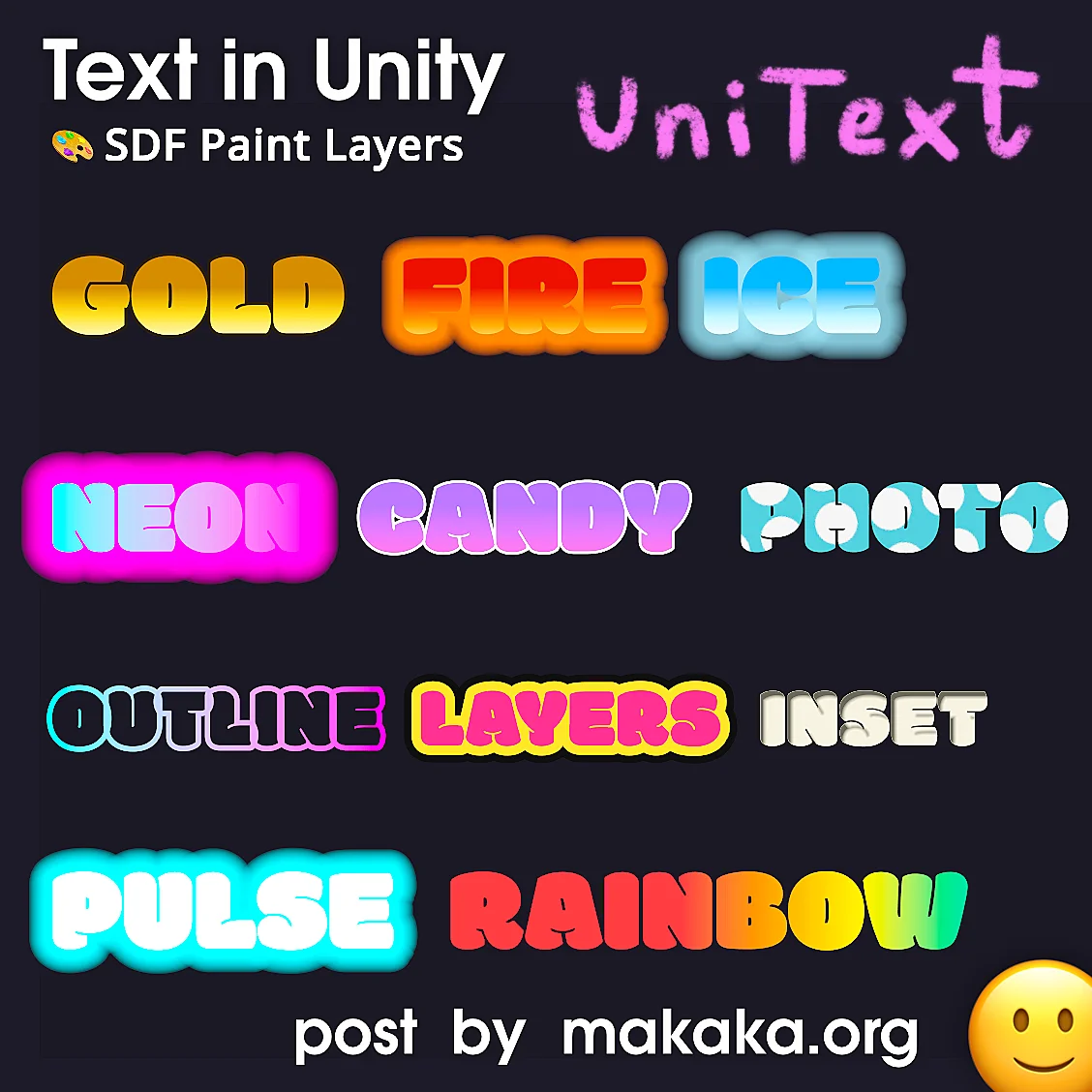
UniText and Layer System of Styles
The Video Demonstration below shows:
- Unlimited Layers — One Draw Call:
Fill, Stroke, Extrude, Drop Shadow, Inner Shadow, Glow, or Your Own Custom Modifier — each with a Solid Color, Gradient, or Texture. UniText gives One Draw Call for N UniText components instead of N Draw Calls for N TMP components. - Animations Integrated:
Wave, Shake, Spin, Pulse, Wobble, Bounce, Float, Pendulum, Glitch, Rolling, Scramble — test them without entering Play Mode! - Any Emoji — Zero Build Size:
They use the Device’s Own Font — No Sprite Atlas, and New Emoji Arrive with OS Updates. - 4-5-6-7 → ∞:
An Infinite Number of Features. You Can’t Even Imagine How Many.
Complete Text Engine and All Languages
TextMesh Pro (TMP) and UI Toolkit Text are typically categorized as Text Systems or Rendering Solutions rather than Complete Text Engines, Based on Internal Market Research by UniText Publisher.
Just Imagine if Any Game could be localized into Any Language (150+) — Without Issues. And the Game Market for Languages that are Missing or Only Partially Supported by Other Solutions is HUGE. Nearly 2 Billion People Use Languages (and Scripts) that Unity’s Official Solutions, such as TMP and UI Toolkit, Cannot Render Correctly, including Arabic, Hebrew, Hindi, Thai, and Bengali.
UniText fully supports RTL (right-to-left) Languages, allowing you to Mix Any Languages within a Single Text Field because it Implements the Industrial Standard — Unicode UAX#9 BiDi Algorithm which passed over 900K Official Conformance Tests.
Independently of the Platform, Font Compression Keeps Your Shipped Game Tiny (with Sub-Millisecond Decompression at Runtime — Players Won’t Notice), e.g.:
- 12.0 MB — Original Font,
- 4.41 MB — In Your Build.
UniText Does Not Have Per-Font Texture Atlases that are included in the build. Instead, it Rasterizes Glyphs Dynamically at Runtime into a Single Static Texture2DArray, which is Managed Using Reference Counting for Each Individual Glyph. So Everything that Ends Up in Your Build is Font Data — Not Texture Atlases. That’s Why UniText is Called an Engine, Not Just a Component, Text System, Rendering Solution.
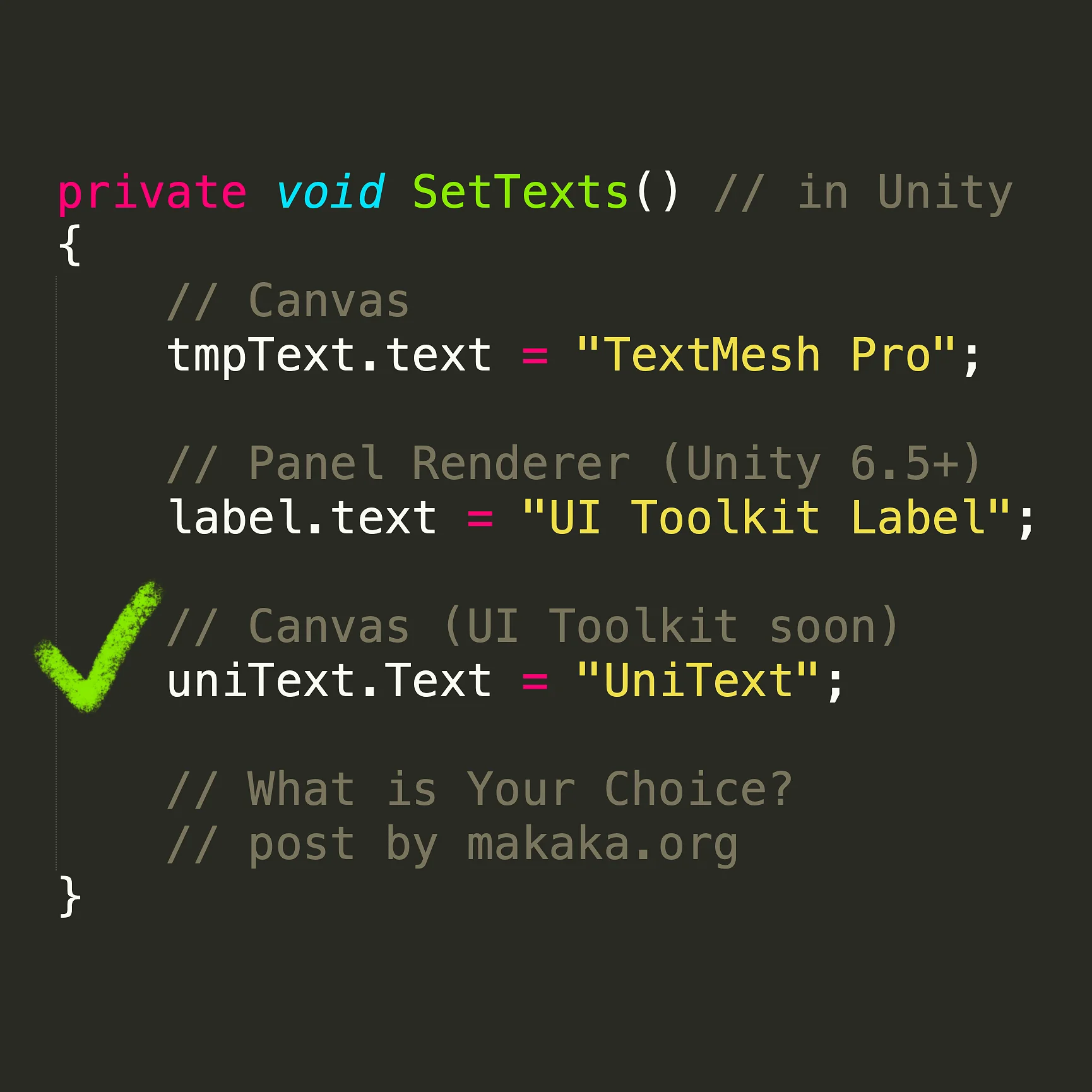
UniText ships 2 Rendering Components. Both Components Share 100% of the Text Processing Pipeline (Parsing, Shaping, Layout, Modifiers, Emoji, Variable Fonts, Languages). Only the Rendering Surface Differs:
- UniText:
Text in a Canvas UI (Screens, HUDs, Inspector Overlays) => CanvasRenderer (uGUI). - UniTextWorld:
Text in the 3D World Space, Particle-Like Text, and Floating Labels => Combined Mesh via an Invisible Batcher.
UniText vs. UI Toolkit Text vs. TextMesh Pro (TMP)
One Day, Unity acquired TextMesh Pro for its Outstanding Performance and Features. The Description of the UniText Asset is So Impressive from a Developer’s Perspective that Unity has to do something with it.
The Feature Set Speaks for Itself: Other Solutions Can’t Do Most of What UniText Can. You can Discover the Complete Comparison Table on the Official Website.
UniText Has Better Performance Than TMP and UI Toolkit Even on a Single Thread. But UniText is Multithreaded by Default, so You Can Multiply These Results by 1.5–2 to Get an Idea of How Much Faster Text Engine Can Be.
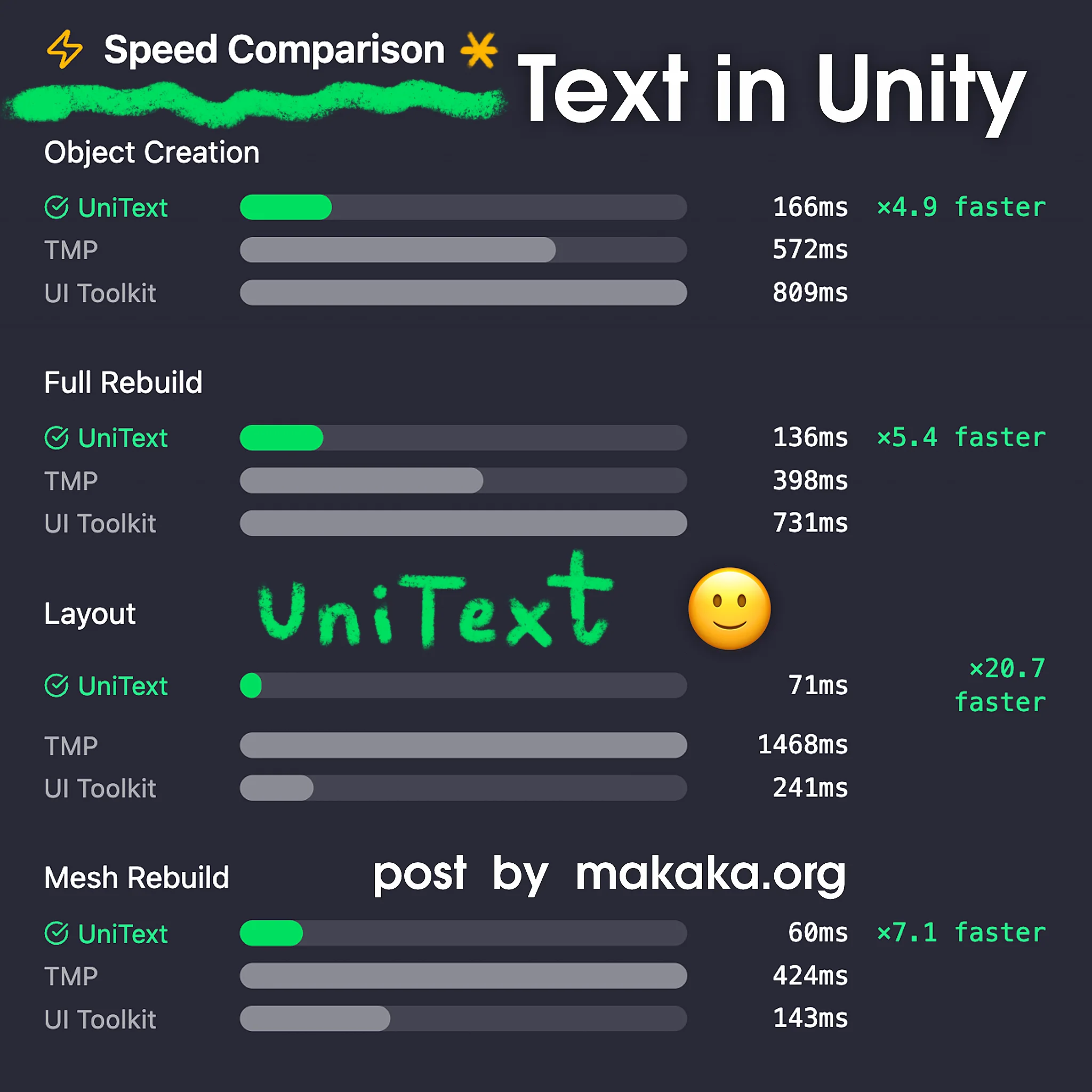
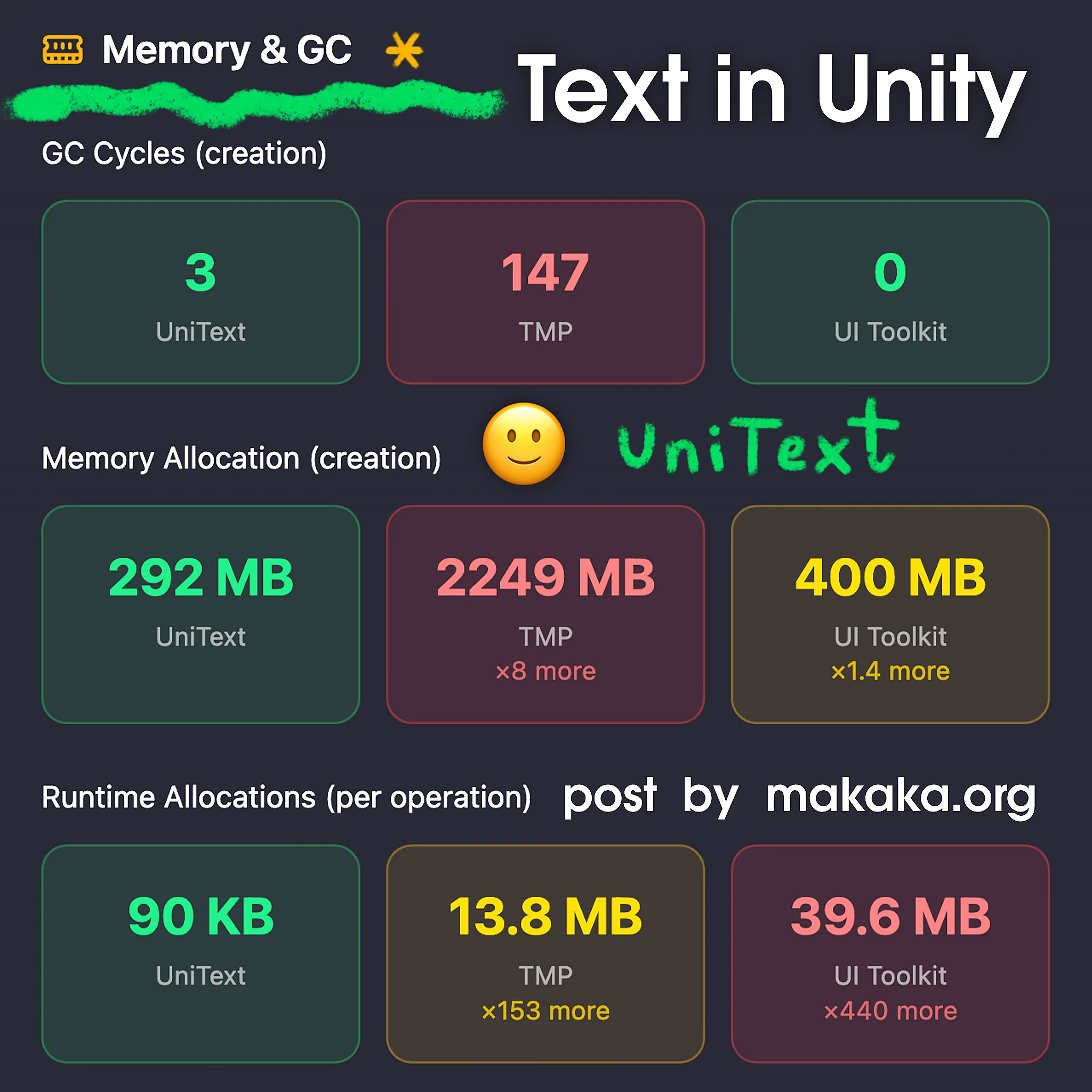
It’s a Pretty Artificial Test on Images designed just to Compare Performance Under a Heavy Workload.
Benchmark Conditions
The Test processed ~230K characters of complex multilingual text to compare the Speed and Memory Performance of different text systems under a heavy workload.
100 Objects, 10 Iterations and 3 Warmup Runs, ~2300 Characters per Object, 4 Different Languages + Mixed Text. Multithreading disabled. 10 Iterations Means the Test was Repeated 10 times after 3 Warm-Up Runs to Stabilize Performance and Calculate the Final Results.
The Origin of UniText
UniText was Developed over the Course of 18 Months — Almost by Accident. It Started with a Simple Goal: Making Arabic Work Properly in TextMesh Pro. At the Time, the Project Needed a User Support System, Which Meant the Text Engine Had to Support Virtually Every Language and Symbol in the World.
The Initial Idea Seemed Simple: Fork TextMesh Pro and Tweak its Internals a Little. It Quickly Became Clear that It Wasn’t Going to Be That Simple. A Large Part of TMP’s Text Processing Logic is Concentrated in a Single 3,500-Line Method, with the Logic Duplicated Across 2 Components — One for World Space and Another for Canvas UI.
What Started as a Regular Work Task Gradually Grew into Something Much Bigger. Before Long, the Project Had Gone Far Beyond the Original Scope and Evolved into What Would Eventually Become UniText with Styles, Effects, Animations, and More.
What’s Next
The Publisher Plans to Implement Virtualization, add More Specific Effects and Animations, Polish Existing Features, make Further Improvements, and provide Support for the UI Toolkit later in 2026. The Complete Ecosystem is on its way (one stack, not 3 vendors):
- UniShapes — Vector UI for uGUI:
One Component renders Fill, Stroke, Shadow, Inner Shadow, Bevel, and Noise as Composable Layers over an SDF, with Outlines from Bezier Curves, SVGs, or Polygons. No Sprites, No Atlases, No 9-slice, and No Re-Export when a Designer Changes a Corner Radius. Sharp at Any Resolution while still batching. - UniLottie — Lottie Playback + ThorVG (Vector Graphics):
Real Vector Animation straight from Adobe After Effects (and Telegram .tgs stickers), instead of frame-by-frame spritesheets that consume memory and never scale. - MoveIt — Animation System (not a tween library):
It tracks which motion owns each axis and resolves conflicts instead of letting the last tween win. Springs can be Re-Aimed Mid-Flight Without Losing Velocity. Momentum Flings use Real Friction. Named Groups have their Own Time Scale. Reduced Motion is Built into the Engine. And All of it can be Authored in the Inspector, previewed in Edit Mode, and Saved as a Reusable Asset.
All Three are built on LightSide.Core, so UniText and UniShapes can animate through MoveIt’s Own Handles, while the Curve Editor that Shapes an Ease is the Same One used to Edit Bezier Outlines.