Unity Affiliate Program — Monetizing Content for Developers and Creators — Tips and Tricks
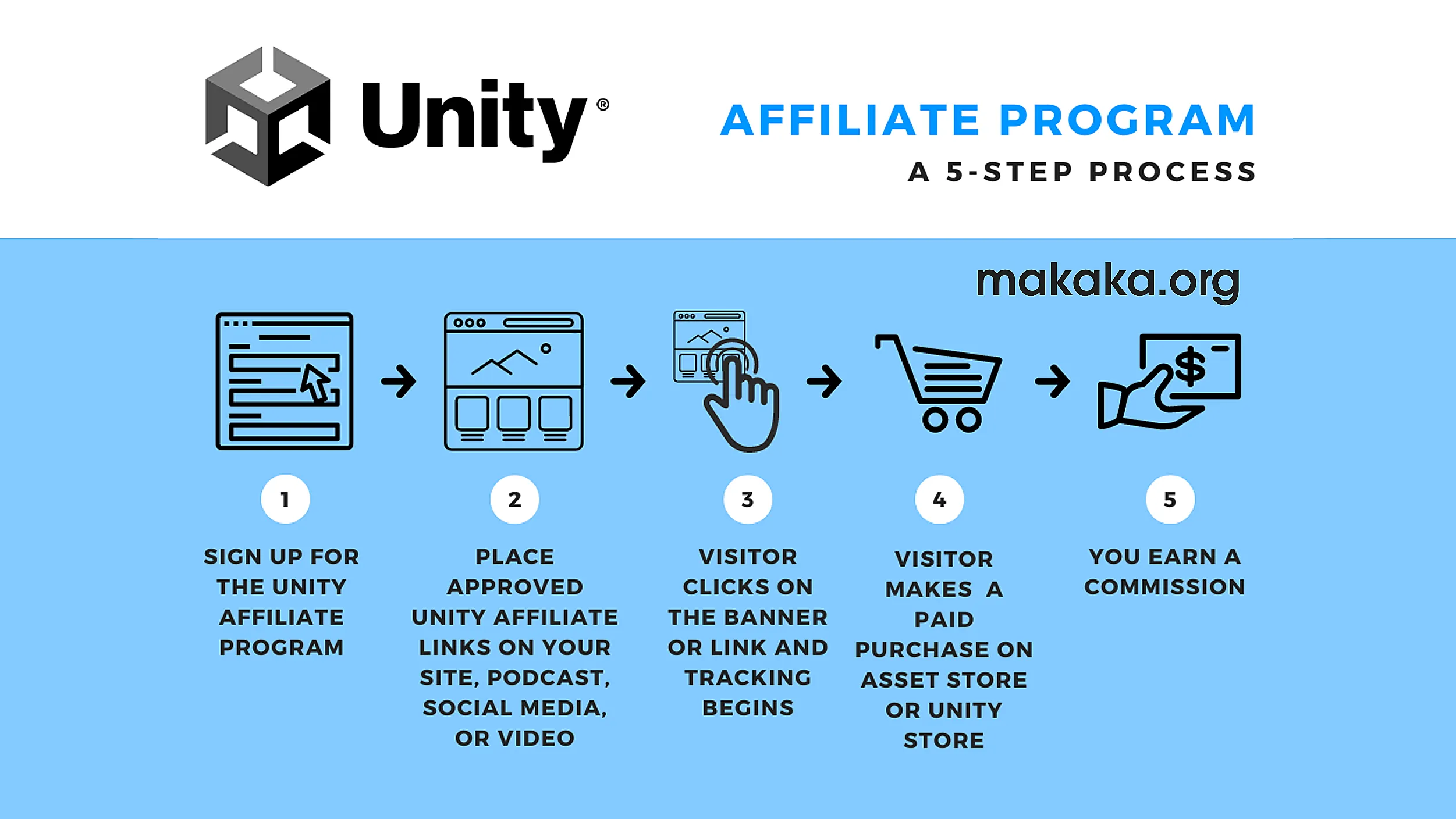

Unity Affiliate Program is a great way to monetize your content while helping Developers and Creators get the most out of Unity. As you develop your Game or App, you can document every step in your videos or posts, highlight the Assets and Tools you use, and earn commissions when others purchase them through your affiliate links.
In this tutorial, as an active Affiliate Partner, I’ll share best practices and explain how the Unity Affiliate Program works, and how you can effectively earn commissions by promoting Unity products.
Unity Affiliate Program Fundamentals
Participating in the Unity Affiliate Program forces you to understand technical nuances and definitions. Being a Partner since 2018, I saw several transition periods of the program, discovered Tips and Tricks, and found the best way of using it, including promoting My Own Unity Assets with Text Links or Buttons like below.

Here are the fundamentals:
- Unity Affiliate Program can also be called the Partner Program. Users are Partners.
- You don’t need to be a Publisher on the Unity Asset Store to get the opportunity to be a Partner in the Unity Affiliate Program that is Open to Any Creators.
- Unity uses Partnerize platform that based on
Performance Horizon Group Limited T/A Partnerize legal entity registered in the UK. - There are 4 places where you can learn all documents, conditions, terms and commision rates that manages the entire Affiliate Program. Although some of the information may be outdated in places, here is a list sorted from most important to least important:
- Partnerize Partner Terms and Conditions (UK Entity).
- Unity Affiliate Program Terms and Conditions (including actual commission rates) are available in the partner console, which will be accessible once you are approved for the affiliate program:
Partnerize platform > Campaigns > Unity Affiliate. - Unity Affiliate Program.
- Unity Affiliate Program for Asset Publishers.
Asset Publishers also have access to the Private Section of Unity Discussions where they can also find conversations about the Affiliate Program. Link for Joining to the Private Section you will find via Email after publishing first asset.
- The waiting time in the queue after the application is submitted for registration in the Unity Affiliate Program may be more than 30 days.

Types of Links in the Affiliate Program
There are 3 Types of Affiliate Links associated with the Partnerize platform, which provide stats for partners and can be generated using:
- Partnerize platform (Tracking section):
- AF Links (New and Recommended) allow you to track purchases on:
- Unity Asset Store (UAS): https://af.unity.com/ot/p3xQZzJ/
- Unity Store: https://af.unity.com/ot/JplYYye/
- AF Links (New and Recommended) allow you to track purchases on:
- Link Maker of the Asset Store requires you to apply your Affiliate ID (aid) on every visit, which is inconvenient and unsafe (you may accidentally use an incorrect ID). Currently, this tool offers 2 types of partner links:
- Direct Links (UAS links without redirects) use the aid parameter in the URL:
https://assetstore.unity.com/?aid=1100lGft - PRF links (deprecated, but still work) use link shortening service called prf.hn which comes from the name of a legal entity of Partnerize platfrom. Ad Blockers knows about this format.
- Direct Links (UAS links without redirects) use the aid parameter in the URL:
The final links contain my attribution in the address bar and in the browser memory (cookies). For the Post-Cookies era, it also contains attribution inside Partnerize platform. Always Test your links and check proper tracking on the Partnerize platfrom (Analytics section > Transaction report):
the clickref parameter from the URL in the address bar should be displayed in the report.
Recommended Disclosure when using Affiliate Links
When posting an Affiliate Link, you need to Add a Disclosure in accordance with FTC rules, which apply worldwide. This type of Disclosure is Recommended by Unity in the Email-list. You have to Use it Every Time when posting Affiliate Links on Social Media or Own Website.
This post may contain affiliate links, which means I may receive a commission if you click a link and purchase something that I have recommended. While clicking these links won’t cost you any money, they will help me fund my dev projects while recommending great assets!
My website includes such a disclosure in both the Header and Footer.
Real One-Day Revenue Data as a Unity Affiliate
Here are all the conversions from one successful day in my affiliate stats. Don’t multiply these $50 by 30 Days to calculate my monthly revenue from the Unity Affiliate Program.
This was just a case of random luck. However, I try to post regularly on My Social Media, so I’d say it’s the result of consistent hard work rather than luck. So, I guess it’s better to call it “smoothie money”.
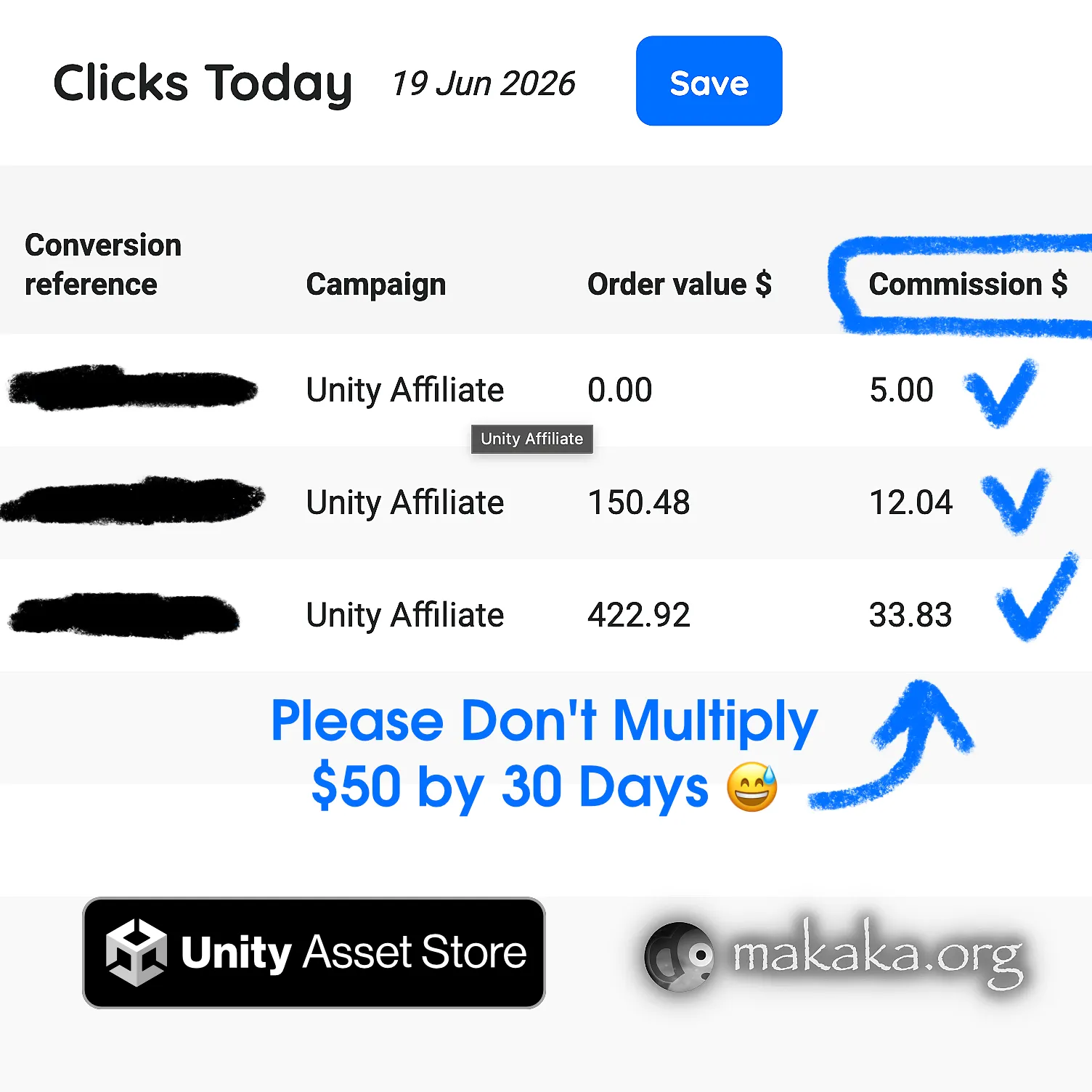
Here’s what people bought on the Unity Asset Store and Unity Store using my affiliate links:
- + $5.00 — Unity Studio: developer registered for a 30-day free trial.
- + $12.04 — Tools (Integration, Terrain), VFX/Shaders/Fullscreen-Camera-Effects, 3D/Animations.
- + $33.83 — 3D (Environments/Fantasy, Vegetation, Characters/Animals), Tools/Behavior-AI (this is a section for Tools on the Unity Asset Store and not Unity AI), Audio/SFX, VFX/Shaders and Fullscreen Camera Effects, Templates/Systems.
Yes, people can spend a lot of money on the Unity Asset Store by buying a bunch of different assets all at once, like in my screenshot above — $422.92.
My biggest purchase was $333, but that was purely for promotion — Not for Developer Deeds. A couple of years ago, the Unity Asset Store had thematic bundles, and there was a Top Contributors list at the bottom. I wanted to make it onto that list in the 1st place — that’s all. However, those lists were removed a long time ago.
WordPress Plugin for Managing Affiliate Links
I use the Easy Affiliate Links plugin for WordPress CMS, on which makaka.org website is built. It covers all the needs of the Unity Affiliate Program and allows you to store all your links in the one place.
This way, my links look cooler, can be updated globally (everywhere on the web where you posted) from a single place if an asset is deprecated or the final link is broken, and cost me nothing.

Yes, you can use your own link-shortening service to hide affiliate links — it’s not prohibited by the Unity Affiliate Program. 301 and 302 redirects work the same way — conversions are registered properly:
- My Redirect Scheme:
https://makaka.org/o/[short_name] —> Shortened AF Link —> UAS Link. - Real Example:
https://makaka.org/o/mega
Some Social Media, such as LinkedIn, hide these links behind their own service (lnkd . in) when the URL is too long. I calculated that this is the maximum URL length that LinkedIn doesn’t hide — in case of my domain name it’s 4 characters after /o/ — the virtual directory for affiliate links.
2026 Year for Unity Affiliate Program
Unity Assets and Other Products (e.g., Unity AI or Studio) deserve better Affiliate Marketing, but the current situation looks the next way. According to reports from some partners, Traffic and Conversions in 2024–2026 are lower than in previous years. I can suppose that 5 factors may have contributed to this:
- Unity Discussions (source) now don’t count conversions as well as other Unity-related websites.
- Google Chrome fights with cookies or something like that (more and more).
- There are so many partners, so your income tends to be lower.
- GameDev has massive layoffs, so people are buying less.
- AI pressure can impact revenue on the Unity Asset Store for ready-made complex solutions or specific styles of 2D/3D Art, SFX, VFX, and more. Some people may prefer simpler AI-generated custom assets tailored specifically to their projects.
The Main Language for Game Developers
When Creating Content for Social Media, I prefer using English (although it’s not my native language) across All My Resources, Devices, and Software because:
- I share GameDev and Unity Tips, and English makes screenshots useful for an international audience.
- When I need to solve Any Issue, most tutorials, documentation, and community discussions are available in English.
- English has been bringing me clients since 2015. In July 2026, I even got my first paid posts.