Publisher in Unity Asset Store: How to Create and Sell Digital Assets?


Here you can find a Complete Tutorial for Publishers on Unity Asset Store but rather on how to Create and Sell Unity Assets as effectively as possible.
The knowledge in the tutorial is universal and independent of the Render Pipeline and Asset Category.
Note: The package in the Unity Asset Store contains a PDF version of the Tutorial, which is also available for free on this page. Consider buying this asset as a way to support the project. Thank you.

Check out the Support section if you need help.
Open to Brand Collaborations and Product Promotion for Unity Assets and GameDev on My Social Media — Reach the Right Developers.
Hello, guys! I’m Andrey Sirota — Founder of Makaka Games and a full-time Publisher on the Unity Asset Store since 2015. This Tutorial is About Many Years of Experience, Mistakes and Success, Nuances of Business, and Helping People Solve Their Tasks. It’s a Product That I’m Really Proud Of.
I have studied all the materials that I could find about the Unity Asset Store on the Web (really, guys, every blue link and my personal interviews with other Asset Store Publishers), but this is not enough to understand the overall picture.
That’s why I decided to write a Tutorial, which answers all the critical questions. So, welcome to the Publisher Community.
For Unity Publishers. By Unity Asset Store Publisher.
Here I’ve systemized all accumulated knowledge and experience concerning the business on the Unity Asset Store.
What People Love in Digital Assets
I spent a lot of time and money on finding out what business is. Business is to benefit people. To understand how to benefit people, you need to find out what people love.
So, people really love numbers.
Here they are:
- In business since 2015,
- First success in 2017,
- 3 failed businesses,
- 1 successful business,
- 18 Active Unity Assets,
- 35 deprecated Unity Assets,
- 21 Unity Tutorials,
- 1 electric guitar,
- 7:17 a.m.
Got a thought?
Whether you’re a programmer, game designer, texture artist or 3D modeler, the Unity Asset Store is a great place to share and sell your creations with the growing Unity developer community!
What if I show you how this can be applied to your products (i.e. Unity Assets)?
- 3 Demo Scenes,
- 17 Levels,
- 2 Modes,
- 11 Customized Prefabs,
- 3000 Polygons,
- 75% OFF (Personal 2-week Sale or Bundle of Assets),
- 5 Events,
- Version: 3.5,
- 4 Characters,
- 9 Animations,
- 57 Icons for Free,
- 3 skins,
- 24-Hour Support.
Next, you will learn what exactly and how to Sell Unity Assets to earn money.
Unity Asset Value
To sell Unity Assets on the Asset Store, you have to give people more value than the product itself. The great value is in numbers, modules, integrations with other popular assets, bonuses, optimizations and so on.
Pay attention to the value of your product and provide more:
- video demos,
- examples,
- documentation,
- communication with people.
Got a thought? Then welcome to business, my friend.

Why do you need to become a Unity Publisher?
Free to make decisions: freely decide what to do and what not to do for the sake of the result. You will have next Advantages:
- Making Games/Apps,
- GEO-Independence,
- Own Business,
- Happiness,
- Great Revenue Share: 70%.
What to Sell?
There are several ways of your development in the store.
Way 1: Unique Asset
You can come up with some unique technology that everyone needs, develop it over the years, and invest the soul in it. In a word, you will focus on the development of a single product.
Fundamental Product
If it is something fundamental that can become a part of the engine, then either Unity Technologies will buy your product if it is fantastic (TextMesh Pro), or Unity Technologies will quietly develop a similar tool, and it can kill your sales in the future.
Shader Forge vs Shader Graph
A little later, after Shader Graph was issued by Unity Technologies, the author of Shader Forge made the asset free for everyone ($85 earlier) and announced the termination of further development.
Shader Forge was very popular, and many companies integrated it into their pipelines. Now in the future they will have to abandon it, as there will not be support from the authors for new Unity versions.
The author of Shader Forge managed to make good money, but at one point the sales stopped.
Not Fundamental, but one of a kind.
If your product does not pretend to be a part of the engine, but no game in a particular genre can do without it, then luck is on your side.
Corgi Engine vs 2D Game Kit
Corgi Engine is the best system for creating 2D platformer, which exceeds many times the functionality of 2D Game Kit by Unity Technologies.
Here is an entirely different situation than with Shader Forge. Firstly, this is not part of the engine but something applied, like a game template. So, why Unity Technologies develop the 2D Game Kit?
Simply because they should extremely provide its users with a free and modern template for 2D games (for educational purposes, for newbies, for people without money). Professionals will prefer Corgi Engine.
Way 2: Regular Assets
If you are a 3D artist, then you can make unique copies of popular models endlessly.
For example, animals, props, buildings, etc. Even if the store has many similar models, you can always make them in a different style, and the product will definitely find its buyer.
Moreover, you can adapt them for Unreal Engine, Godot Engine and work on several fronts.
That is, you can always offer your own interpretation of banal things. Here you can win by the number of products in the store. You will not get rich at one time, but you will always have a job and a profit.
Way 3: Mix
The best approach is to alternate the development of unique assets and regular assets. Thus, you are insured from all sides, and also you get a chance to extract super profits.
Product
How to create any product?
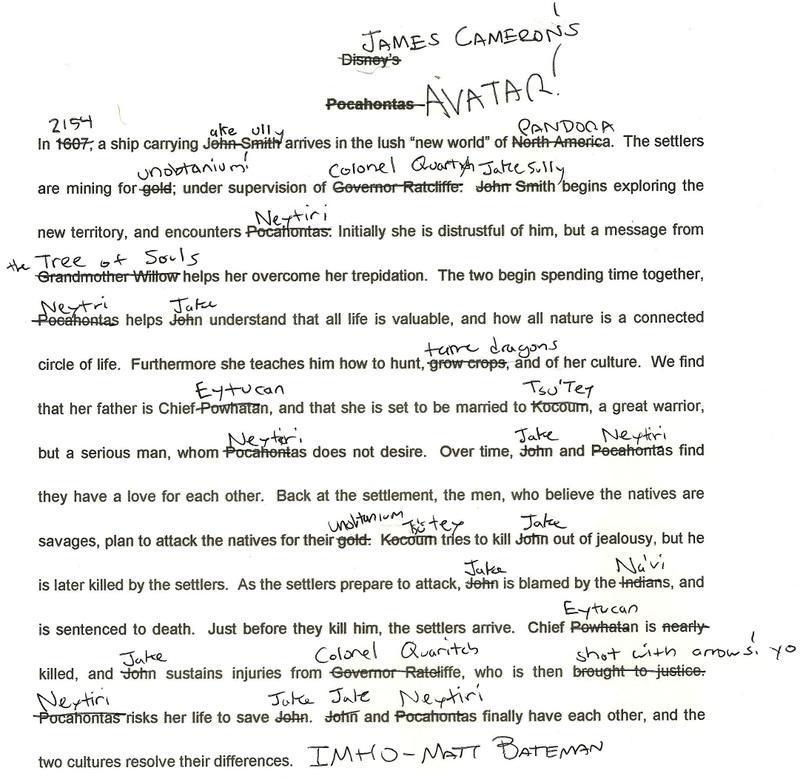
Unity Asset, game, music, video, clothes, food, house – it does not matter what a thing. The whole point is to go to the original source (or its modification, most likely) and rethinking it in a new way.
No matter how many competitors are in your niche (3D models, icons, scripting, etc.) because you can always do better and give more value. Let’s see how this is done by creating a new scenario through modification of the old one by James Cameron (filmmaker):
A Classic Mistake in creating a New Product: MVP
Today is the 15th of May 2018. For almost 2 months (in total) I’ve been working on a new Unity Asset called Throw Control (docs), which will be integrated into several of my other assets.
This is not a new feature for existing assets but a steep improvement and greater modularity. As a separate product, it’s something new with many customizations.
And only today I realized that regarding the new product, I made a classic mistake of startuppers. This was told by some mentors from the Business Incubator of the HSE University.
The product itself was done one month ago. At that time, it was necessary to submit it to the Asset Store.
But suddenly, I came up with one new feature, the implementation of which showed me an architectural error of the whole project: any next innovation could not work properly.
I emphasize that without this new feature, the project code was stable and worked perfectly. This was the most suitable time for submitting to the moderation, and I missed it.
It’s certainly great that now the product will be better & more qualitative, but it’s a bad business approach that kills sales to zero, and development costs become more serious.
If you have an MVP (Minimum Viable Product), then you need to:
- Immediately test the market.
- Analyze the results.
- Correct the product (presentation, features, price) — Make a Pivot.
- Check if there is a reason for further development.
Naming, icons & presentation
The Throw Control (docs) asset is designed for 3D space (although it can easily be adapted for 2D), and its first-view presentation in searching on the Asset Store does not appear correctly (as if only for 2D).
With such a small canvas size of the Icon Cover, I was unable to place images in 3D clearly enough, so I just had to make icons in 2D. But I still have to show that the product is designed for 3D.
So, I made new icons and added a 3D prefix to the product name: “Throw Control 3D”.

The icon is the first thing that customers see when searching in a store. The next things are name and rating. So, it is critical that your icon and name convey the full essence of your product. You also need to learn about naming and SEO further in the tutorial. Logos and branding are so important.
In a big part of the world, people cannot read French or English but are great in remembering signs.
Karl Lagerfeld – German creative director, artist, and photographer.
Modularity
I use a modular design for some of my assets.
It’s a design approach that subdivides any product into smaller parts – mini products (modules) that can be independently published in the store and then used in different projects.
For example:
- FPS Shooter 3D + AR contains Sensor Camera that is part of other Assets (e.g., Basketball).
- Basketball 3D + AR in turn contains Sensor Camera and Throw Control, and so on.
So, there is a reduction in cost for some customers. Not all people need to buy a large and expensive package for $50. Some people may need a small part of it at a lower cost. Everyone has different needs and different financial opportunities, so you can satisfy every customer in a simple way.
This is a win-win situation for all. The more you sell, the more happy people in the world.
The same way a multilevel nesting can be obtained. So, on each asset store and documentation page, I include the link to the Map of Assets to help my clients decide which product they need.
Map of Assets
So, if your products have modularity and they are connected with each other, then you need to clearly present these connections in addition to mentioning them in the asset description.
I use a Mind Map diagram to solve this task with apps like MindNode. You can export a PDF file with active links and upload it to your website.
Therefore, you can use my full-screen interactive map to see how my Unity Assets are related to each other. The sharp (▷) tip shows that the ancestor contains this product.

DLC & 3rd Party Assets
You could observe similar modular mechanics with DLC in Steam (Cities: Skylines II & thematic add-ons). But in this case, the dependencies are slightly different. You can’t run the add-on without the base product (“Bridges & Ports” expansion requires the Cities: Skylines II game (sold separately) and all game updates to play).
Such a method can also be used in the Unity Asset Store, and not necessarily with your own product. Pay attention to the asset called Modular Traffic for PlayMaker. It requires the PlayMaker plugin to work. For such situations, Asset Store product pages have a separate native section called “Package dependencies”:

A Unity GUID is a file identifier within Unity. Video Tutorial below shows why it can be useful when dealing with the Unity Asset Collection, where Assets are connected to each other. The “connection” between Your Project and such 3rd-Party Files is provided by GUID in .meta files.
Let’s consider the situation when you provide the Main Asset and optional Add-ons for it. The Main Asset can have references to the Add-on to set up the environment and other things.
When Importing the Add-on, you can add Custom Scripting Symbol in settings via code:
Edit > Project Settings > Player > Other Settings > Script Compilation > Scripting Define Symbols.
In the code of Main Asset, you can check this symbol using the known way with Compiler Directive when you target your code for a Specific Platform.
Cooperation
You can cooperate with 3rd-party Publishers and ask them to add a link to your asset or add your video demo on their asset’s pages. The same actions are necessary on your part. Just ask, people are usually very responsive, and it is beneficial to both parties.
So, I recorded a promo video for my AR Camera Lite with Cute Zoo Unity Asset. Then I just wrote to the asset author and asked to add my promo video to the “Cute Zoo” page. Success! Everyone is happy. Our cooperation lasted for several years.
If you want me to use your assets in my promo videos, then just contact me.
Bundles
Currently, the Unity Asset Store does not have a tool that allows you to automatically combine groups of packages at a target price, but you can use the Upgrade Mechanics of the store to avoid uploading separate packages to the bundle package with the next message in the description: “After purchasing this bundle, visit each package listed below, add to your assets, and you will be able to get them for free”.
So, you must set an upgrade from your bundle to each separate package with the next characteristics:
- Price = Free;
- Type = Lite Edition.
This way, users buy the bundle at the target price and download each package from its page.
Packages in bundles do not have to be nested in each other. You can freely combine your packages as you want into the bundles.

Check my example of a bundle: AR Bundle — Complete Collection of AR Projects & AR Tools. Templates are ready to Build for iOS/Android and Upload to App Store/Google Play. Create your own AR App or Develop an AR Game in 1 day!
Example with 3D Models: Zoo
If you have a large 3D package with a whole zoo of animals, then it makes sense to sell each animal or group of animals separately. Check the MEGA Cute Pet Zoo Bundle.
On the other hand, the whole zoo should cost less than all the animals in total. Thus, if the customer buys a whole zoo, he will save some money. The publisher, in this case, is still in the win because a one-time payment for the zoo from the customer is more than payment for one animal or a small group of animals.
Even if you sell a whole zoo well, and people do not buy some animals separately, it does not mean that they need to be removed from the store because they are good marketing tools to attract people to the more expensive of your packages.
Unity Versions
You should regularly publish updates for new versions of Unity.
And it is necessary for two reasons: errors and loyalty.
The Unity engine is constantly being improved:
- Something changes its architecture (e.g., TextMesh PRO & Unity 2018.2).
- Something becomes obsolete and is replaced by a new code (warnings, which indicate you to rename some fields or methods because with some next Unity version, they will be removed, and your code get the errors).
- Something is removed forever (Everyplay).
Minor changes appear with new patches (2022.3.62), and large ones with major versions (6000.3).
To keep your asset clean (i.e., no warnings) and error-free, you need to check it for compatibility with new versions of Unity. Even if the asset does not contain errors or warnings, you still need to upload updates to the store. It shows your potential customers that you are involved in a project and support it even though new features are not being implemented. It causes trust in the product and increases loyalty, and as a result – increasing of sales.
Use this tutorial that explains how to choose the Best Unity Version for your Assets and Games.
P.S. On the Unity Asset Store, a Publisher can Update the Asset, without modifications, e.g. v5.0.1 with release notes kinda “Fixed Readme”, just to raise it in the search as well as increase willingness to buy, because it is “constantly updated”. Uploading an Update from the Editor guarantees that the “Latest Release Date” is refreshed on the Product Page.
Render Pipelines
The Render Pipeline (RP) in Unity affects how your game looks. Shaders, Materials, and Project Settings depend on the RP you choose: BiRP, URP or HDRP.
In 2026 we have the next situation:
- BiRP (Built-In Render Pipeline) is in the deprecation stage. It will not be supported in the upcoming Unity versions.
- URP (Universal Render Pipeline) is the standard for most projects.
- HDRP (High Definition Render Pipeline) is intended for stunning and complex visual styles requiring powerful hardware. It will be merged with URP in the future.
So, URP is your starting point for New Unity Asset.

There are 3 approaches for uploading asset with different RPs:
- Separate Assets (Asset Pages) in the store with Different RPs, so you can have 3 separate assets with different names, e.g.:
- Assetcraft BiRP or Assetcraft BRP.
- Assetcraft URP.
- Assetcraft HDRP.
- You can upload packages with different RPs using the different Unity Versions inside the only Unity Asset in the Store, e.g.:
- 6000.0.60f1 for BiRP,
- 6000.0.61f1 for URP,
- 6000.0.62f1 for HDRP.
- Upload Asset with one RP but provide a tutorial about importing attached .unitypackage files with Materials/Shaders that have the same GUIDs and (optionally) names to replace appropriate files for different RPs.
It also depends on the category you choose for the asset: Complete Projects (Templates) or not. Assets in the “Templates” category are uploaded with Project Settings in the package, e.g., FPS Shooter.
Anyway, after uploading the package and before publishing, you need to download it from Publisher Portal and test the importing/installation as a user will do.
Checklist: How to Create a Unity Asset?
Publishing Unity Assets in a store is always a process with the same actions. These actions can be optimized and standardized to avoid mistakes and save the developer time.
Over the years of publishing in the Unity Asset Store, I have developed my own PDF-Checklist for Creating a New Unity Asset in any Category.
Andrey Sirota, Founder of Makaka Games

Using the Asset Checklist (PDF-file with clickable links), you can easily create high-quality products. It can also be used when you need to create a Product Update.
Company & Marketing
Openness: First Principle in Company Development
One of the principles by which I develop Makaka Games is openness.
Talk about your current work, plans, share screenshots and videos, and communicate with your subscribers. All this gives you a chance to be noticed and increases loyalty to you and your products.
All Marketing consists of telling about every step: about victories and failures. It increases trust, activity, and so on: even text posts, even without any images, but at least the things you have the strength to do.
An Image Post is better, a Video Post is even better, and adding Shorts from this Video is even better.
Here is my review post on Unity Discussions that has caused another positive feedback about the 3rd-party Maintainer asset. The publisher can respond to each message, make a screenshot and tell about it on other Social Networks.

SEO
SEO (Search Engine Optimization) is designed to help people find what they really want to find.
In 2017, I got acquainted with SEO in more detail, making sure that this area of knowledge provides an opportunity for prompt and accurate satisfaction of people’s search queries.
Today, search engines exclude virtually any fraud with SEO.
SEO works everywhere on the Internet: on any website, forum, or social network. The SEO rules differ on different websites. So, searching in the Unity Asset Store differs from searching in YouTube or Google.
The more information about your product in any search engine and the more qualitative your information, the easier it is for people to find your product & make them happy.
Any media resources will help you with this:
- Thematic Articles and Tutorials,
- Screenshots,
- Public Documentation,
- Topics on forums,
- Discussions in comments,
- Video manuals & promos,
- Video examples of your assets in real games or apps,
- Customer reviews,
- Sketchfab demos,
- Demo Apps in App Stores,
- Any related content.
That is, the more you are open to the world, the better it affects SEO. The more information you provide about the product, the higher the conversion of visitors into buyers.
SEO is a whole science, so I recommend that you study specialized resources on this topic.
Brand Name
In 1992, little Andrey said his first long word: “Makaka” (that means Macaque in English). So, the “Makaka” studio history began. January 6, 2015: In the 9-minute stream of super-revolutionary neural connections came up with a name for my own game development studio.
I needed this action to be able to publish my first Unity Game called “Kaspi Kitten” in the digital mobile app stores. It’s the game about saving kittens from abduction by aliens.
Here I recalled my first long word. The same day, the domain name was registered: https://makaka.org.
If available, you should use the .com top-level domain as it is easier to remember and type. Today, the original goal of the whole .org zone has lost its relevance, and here you can register websites of any genre, not just non-profit organizations.
The “Makaka” name was completely uninformative and does not reflect the essence of the company’s activities. Good examples of the initial choice of the name can be spied in successful cases:
- Apple Computer (abandoned the “Computer” prefix in 2007),
- Unity Technologies (shortened the main product name from Unity3D to Unity).
They changed names to less informative because they can already afford it, having behind their shoulders successful brands that are known all over the world. It’s neither my case nor the case for most publishers in the Asset Store.
After studying different names of game companies, taking SEO into account, I decided to change the name from “Makaka” to “Makaka Games”. That is, I did everything on the contrary, “returning to the roots”.
If you do a rebranding, then do it in all aspects. The studio logo in 3 moments has changed from a children’s style to a more neutral, harmonious and mysterious look. Most of all, I like how it looks on the black background.


SEO counts behavioral factors. This is how the user behaves on your web resource, on what buttons he presses, how much time he spends on a particular page, and so on.
If your Header Logo (and also every element) on the website looks bad, it means the user will have less confidence in your website, and he will leave the page early, which will badly affect the SEO performance.
Website, Documentation & Articles
You really need to have a website with a unique second-level domain to solve 3 issues at once:
- Follow the Submission Guidelines of the Unity Asset Store: points 4.1 and 2.3;
- Provide Public Docs to be more open to Users and Search Engines (it’s good for SEO);
- Create PDF Docs conveniently (it’s needed to put them in the package before uploading to the store).
Shortened Link to the Asset
You can create a Shortened URL for your Unity Asset in the Asset Store and use it Everywhere. Example: https://makaka.org/o/ar .
If the final link changes, it will be easy to make a redirect with the next tools:
- WordPress plugin for your Own Website: Easy Affiliate Links — I strongly recommend you deploy such an independent link service to be more confident in your links.
- Web Service: Bitly.
Additional Information in the Docs
If the Docs contain Affiliate Links or Ads, warn about it at the very beginning.
Take a note of the emails (or any support platform that you use) that people write to you, and include in the documentation the most valuable and repetitive information.
Any related and useful information on the subject of your product creates a good background for SEO of your website and also (and most valuable) for people. You can create separate pages/articles/tutorials for this goal when the information is large enough.
The more detailed and richer your documentation, the less work you will have to process emails during support.
If you are a 3D-Artist, then you can tell about the relevant workflow:
- How exactly do you model?
- And what tools are used?
- How much time do you spend on your actions?
- What features do you use in your work?
The coolest thing you can do is act on the following scenario:
- Make a video lesson.
- Upload it to YouTube.
- Create an article with this video on your website.
- Duplicate the text (which you spoke in the video) in the article in text variant.
- Also, paste this text for the YouTube video in subtitles and description.
So, you will make a material for the several search platforms with good SEO.
This section will guide you through converting your Online Docs on a Web Page into a PDF file.
Preparing your page before Creating the PDF
You can create a duplicated Private Post and remove unwanted elements here. Unwanted elements outside the post text can be removed by Chrome DevTools by deleting target HTML tags.
Before Creating the PDF, check that your page is shown completely:
- Load Images manually by scrolling down if Lazy Loading is on.
- Expand folded sections.
Unwanted Elements:
- HTML anchor of the link in the Address Bar: https://makaka.org/unity-assets/gallery-kit#tutorial .
- «Private» word in the Post Name.
- Unity Logos.
- Date.
- Videos & Image Galleries.
- Button «Edit Post».
- Advertising banners unrelated to the post.
- Comments.
Creating the PDF
You can easily create a PDF file of your documentation with the next options:
- Google Chrome > File > Print > Save as PDF;
- Print Friendly & PDF: web service and extension for Google Chrome.
Asset Store
Free Unity Assets
You know, most people want to download all the stuff for free. That is, some people by default look for assets in the store only with a free price tag. Therefore, your product can be unreachable for these people.
So, bring the Power of SEO and make free asset for Promo Purposes.
Or you can make a free version of your paid product, but with limited functionality. In both cases, people who originally did not intend to buy anything can become your customers.
For example, people can test a free version of your paid product, make sure of the quality of your product and understand that they need to buy the full version. Or your completely free product will lead people to your other paid products.
So, once I was looking for clouds and I found the free asset called Farland Skies – Cloudy Crown. I tested it, and I loved it. In the end, I bought a pro version with more functionality because the asset has excellent quality and creates days and nights in the game: Farland Skies – Cloudy Crown Pro.
I also have 2 free packages with mobile icons (because most of my assets are designed for mobiles):
They collect more than 100 downloads per month, providing icons for mobiles, and my other assets are mobile-first projects, so I get some free user traffic for many years.
Gift Program
You can reward your customers for certain actions. So, I have a Gift Program.
Upgrades
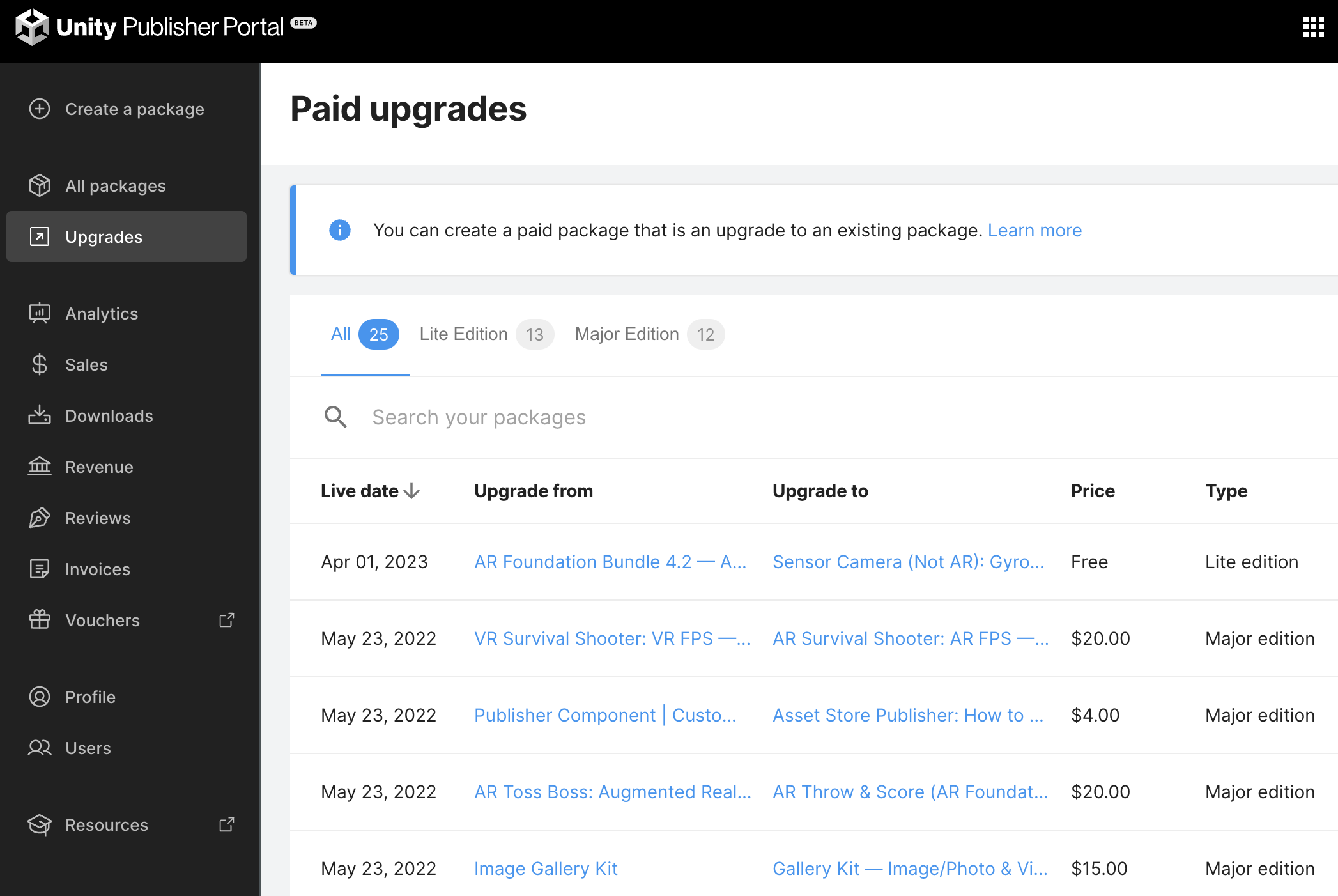
If the client bought a Unity Asset, then he can easily get a discount for the next product using Upgrade Mechanics that Asset Store provides.
You can see the resulting price with the discount on the Asset Page when you are eligible. People love upgrades, and sometimes people use such an opportunity, as I can see from the sales statistics.
Lite Edition
You can create upgrades between different assets using the “Lite Edition” option wherever it’s possible. The only limitation here is the price. You can upgrade from a lower price asset to a higher price asset. Use this way also to Create Bundles.
Major Edition
Major Edition (also known as Paid Upgrade) is used when you release a new paid version of your asset. With this mechanic, your reviews can be saved on the asset store. Use this way also to prevent piracy.
Lists
The Unity Asset Store supports the lists of assets. In addition to the map of assets, you can make thematic lists to differentiate assets by different parameters to orient the customer: animals, houses, 3D, 2D, vector tools, VR, Complete Projects, Gallery, Editor Tools, AR Projects, and so on.
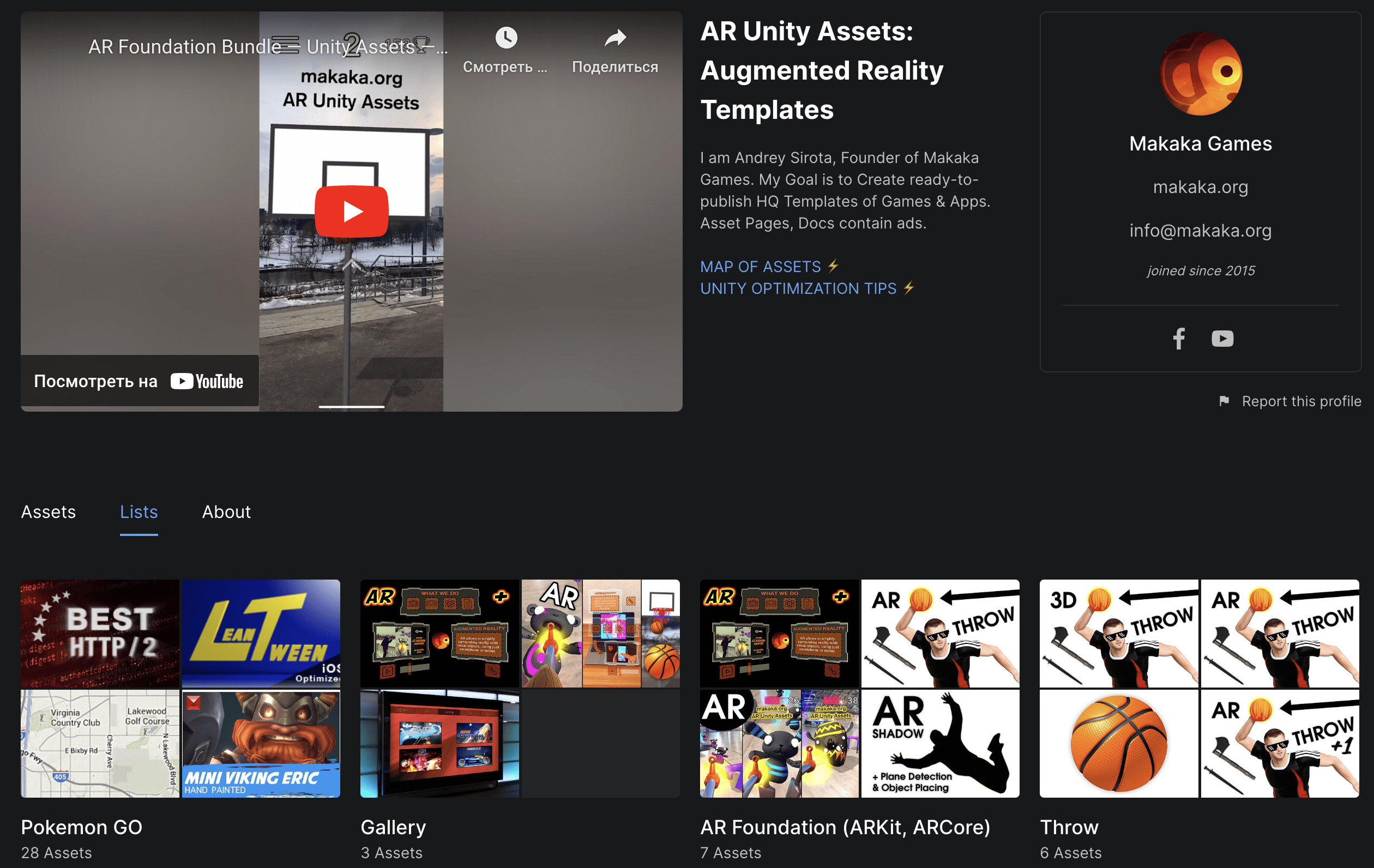
Lists can be seen on the publisher’s page. So, it’s easier for people to find suitable assets.
Moderation
Expensive Unity Assets pass moderation faster:
- $300 asset passed it in 7 days.
- $20 asset must wait 50+ Days.
Price affects SEO as well.
Why is the first submission important?
This story is about Shun UI case.


Take your first submission very seriously:
You need to Create Appealing Marketing Materials and Deliver High-Quality Unity Asset to Get Noticed by the Asset Store Team and have a chance to be included on the Top New Assets page or featured on the Main Page. You will not receive any notifications if you are selected.
Search in the Unity Asset Store: SEO with Naming and Prices
- Sales are important on the Unity Asset Store, but let’s consider the next points without them.
- The Search here is very specific. It’s not a Google. It works very clumsily, without AI, there are direct instructions. The relevance of the search does not depend on the quality of the asset, unfortunately.
- Asset will rise in the search results when changing the price in any direction or the product name.
- Assets with higher prices are shown higher in the search.
- Assets with a price of $20 and above can participate in the sales by invitation from the Asset Store Team.
- You are breaking the search engine when adding more words in the Title. Fewer keywords = higher position and relevance in the search.
How to Price your Unity Asset?
I’ve done a lot of Experiments with Asset Pricing along the way:
some were successful, some were not.
The Asset Store Team provides publishers with Pricing Comparison Data, which shows the average list price over time and by category for the top 10%, top 100, and all content.
You will get full access to this data in the private Discussions section for Asset Publishers. After your asset is approved, you’ll receive an email with instructions.
But in this post, you will see my visual representation of this data, updated on February 10, 2026.

Some conclusions can be drawn from this. For example, the top 10% of publishers tend to set the average price levels within their categories:
- As a rule, cheaper packages do not rank highly in Unity Asset Store search results.
- At the same time, there is a package priced at $1,500 that has been sold 4,000 times (industry-specific, digital twin), as stated by the publisher.
- My highest payment (as a user) so far is $333 for an Asset Bundle.
Personal results may vary.
A favorite message from the Asset Store Team.
P.S. AI Image Generation is great, but I spent several hours refining this image, so human work matters. Likes and shares are welcome.
Providing APK Demo
My potential clients (Developers) ask me for APK files sometimes “to feel the asset completely”.

3 Reasons Why I Avoid It:
- 90% of People that ask for a Demo File will not buy the code, as my 10+ years of experience show.
- I provide Videos, Screenshots and Complete Description and believe that this is enough to understand the Unity Asset value.
- Unity does not use Code Obfuscation by default. So the code can be revealed via Reverse Engineering. To obfuscate your code, you need to buy a 3rd-party plugin and spend extra time to create a secure APK, upload it, and send it. So, the game’s not worth playing.
.
But if you want to obscure your app for Publication in the Apple App Store, Google Play, Steam, etc., you can use plugins like Obfuscator Pro.
Unity Discussions
You can help people find answers to the questions they ask, advertising your product or your website (e.g. “2018.2 TextMesh Pro. Plugin Errors”). You must answer briefly and clearly and give more information on the link to the post on your website. This will lead Unity Developers to your website.

Find thematic questions (Google Search) related to your asset and answer them to help people solve the task with the help of your asset. Don’t spam in all questions that are very little about the topic, and don’t post the same messages. You will be blocked. Very strictly select questions that you can clearly answer. Answer individually, considering the specifics of each question. All behavioral rules can be found here.
Private Category: Asset Store Publishers
All Asset Store Publishers are invited to join the Publisher Section of Unity Discussions.
This subforum (it will become available after your application is approved) is a platform for publishers to grow as a community by holding discussions and sharing ideas.
Public Category: Community Showcases
You must promote your assets in the “Community Showcases” forum section. Topics on the forum appear quickly in Google Search, while adding any page of your website to Google Search can take weeks.

Moreover, some developers love to communicate with the publishers in this forum section, so:
- Save the topic links in your notes (because you can lose them) — Example;
- Post Information of Product Updates as new messages in your topics;
- Subscribe to Email Notifications to answer the customers timely.
This way Unity Discussions (Community Showcases) is the standard forum platform to provide support.
Videos
You need to make a video for every update you make, every single piece of your news because the video is a trend. When you make a video, you have to upload it to all social networks that you manage, and not only to YouTube. Not the only link, you need to make native uploading for each social network to increase views because native videos are played automatically.
Licensing in Unity Asset Store
The biggest risk when you sell Unity Assets online (icons, plugins, 3D models, templates, etc.) is licensing and piracy. Both of these boring questions can make any IT Business unprofitable.
So, here I will guide you in this topic and just, for example, compare licenses for Unity Assets and for WordPress Plugins/Themes.

License: Unity Asset Store EULA
Unity Asset Store EULA describes under which conditions you can publish Unity Assets.
Point 3.5 prohibits piracy:
“Except as set forth in the EULA or a Provider end user license agreement, you agree that you will not use, reproduce, duplicate, publicly display, publicly perform, copy, modify, adapt, translate, prepare derivative works of, distribute, transfer, license, sublicense, rent, lease, lend, sell, trade, resell, or otherwise commercialize or monetize any Asset that you have licensed from the Unity Asset Store for any purpose.“
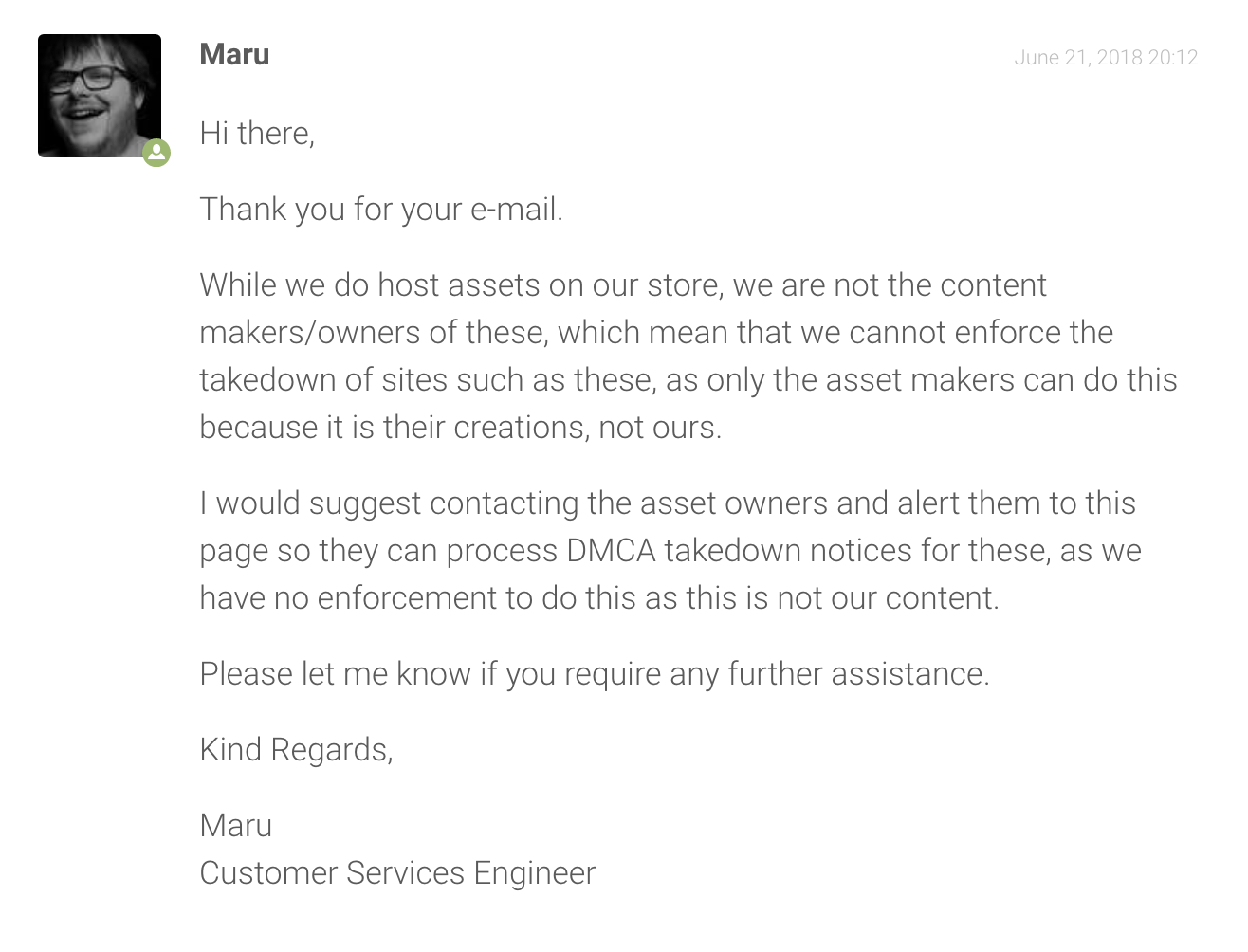
At the same time, I repeatedly appealed to Unity Support to take measures against illegal asset distribution on pirate websites. No support with it.
Unity says that YOU must take care of the legal using of your intellectual property like digital assets by yourself.
License: WordPress GPL
GPL (GNU General Public License) describes under which conditions you can publish WordPress Plugins/Themes.
In short, any paid solution for WordPress inherits the GPL license, which means it can be freely or at another price (low or high) distributed by third parties. You can also get a paid project, modify it, and share it as you wish, but also under GPL.
In other words, we have legal piracy for WordPress stuff. Everything is legal. Such a model of Software Business is defective for plugin authors, and this entails monetary losses.
The type of licensing for WordPress is not going to change.
On the other side, there are many successful cases that would not have been possible without WordPress. People love the support and bug fixing that paid products provide.
GPL Clubs
GPL Clubs are communities for resale or free distribution of paid WordPress Plugins and Themes without support and, more often, without automatic updates.
You can read about how to protect your intellectual property in the next article: “The Ultimate Guide to Legally Protect Your GPL WordPress Plugin Business Against Trolls”.
Conclusion
Cool idea of the product is at the head of everything.
Both user communities are huge and, accordingly, the markets are large, but:
- Unity has more correct license for Asset Store Publishers without legal piracy.
- WordPress with GPL and legal piracy also has the right to exist because not all people know about GPL Clubs yet (but times are changing). There are many successful cases here like Yoast SEO plugin or the Avada theme.
There are always clients who need premium support and time saving.
Such people are definitely looking to save money, but they are not looking to steal. For example, you can make cheaper annual support than half a year support like on Envato Market.
Anyway, you need to analyze which of your ideas is better in different fields: Unity Assets vs WordPress Plugins and Themes. Make the right decision and Good Luck with Best IT Business Online!
Using the Unity Logo
All the rules about using the Unity Logo, you can read here. Some explanations and my understanding will be provided below. This is not a legal recommendation.
The Main Goal of the Guidelines for using Unity Trademarks is next:
Unity Technologies company does not want you to associate with it when it is not necessary or can harm its reputation.
I made some buttons with the Unity Logo for different purposes, using the well-known style of Google Play/App Store button. Note: You can use them with the mention of this website: https://makaka.org .
It’s safest to use the logo called “Made With Unity”. I use it for ad banners for Assets on the Home Page:

For Tutorials or Blog Posts, you can use the “Unity” logo:

My website uses the Jannah Theme for WordPress which uses Font Awesome library to get Social Icons in the correct places: Header, Footer, Sidebar, Mobile Menu. I also use the Unity software icon here.
The “cube” logo is only to be used when the economy of space for a logo reasonably demands it – in other words, when using the main corporate logo would result in it looking “too small,” unclear, or distorted.

So, this “social” Unity button follows to my publisher page, and not for home page of the Unity Asset Store, so I don’t pretend that I am an official person of the Unity Asset Store team and so on, I am just a publisher — 3rd party person. I believe this is not prohibited, and moreover, Font Awesome provides me the icons to use them such way.
So with this logic in mind, you can also use a long “Unity Asset Store” button in the Footer and “Download on the Asset Store” button in the Online Documentations of Unity Assets you develop:

Note: these buttons were also created by Makaka Games, so mentioning of https://makaka.org website is required when using.
You can’t use any Unity logo on Asset Store pages or in the Docs included in the asset folder.
Unity Publisher Sales Statistics
Here you can find analyzed Sales Statistics of Unity Assets by Makaka Games as well as 3rd-party Asset Publishers’ Stats that were found on the Internet, discovering some interesting behavior patterns.
The presented Unity Asset Store Statistics does not show the number of Asset Store Sales since such information would be useless. Much more interesting and useful is how a certain action or event affected sales stats and results.
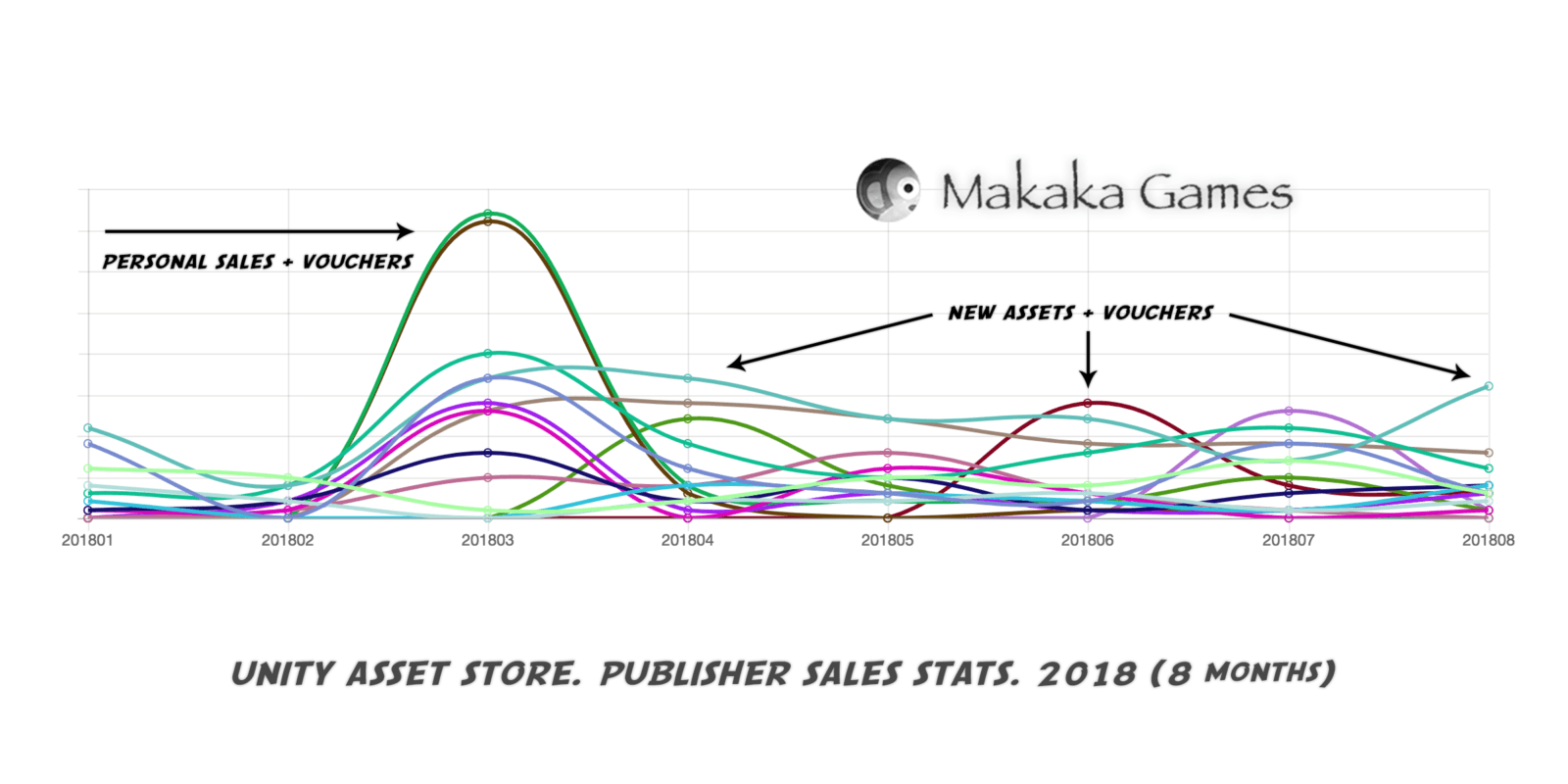
Graphs Rules:
- The heights of the graphs for each year are independent of each other.
- Each line represents one product.
- Line height shows the relative number of publisher sales of a single product.
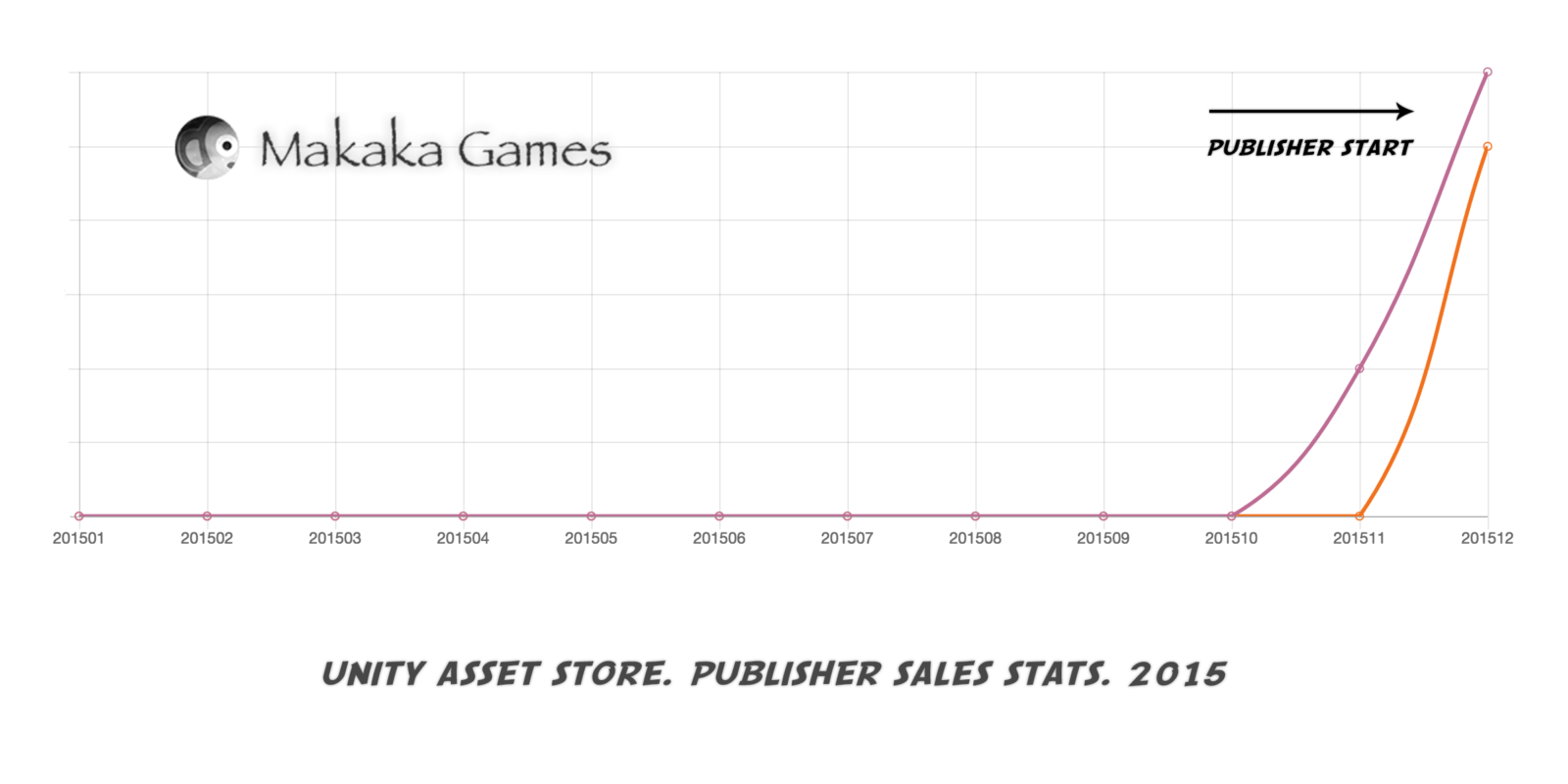
Publisher Start: New Unity Asset
If you have a new Unity Asset, the market will respond to it.
Vouchers, Featuring, 24-Hour Sale
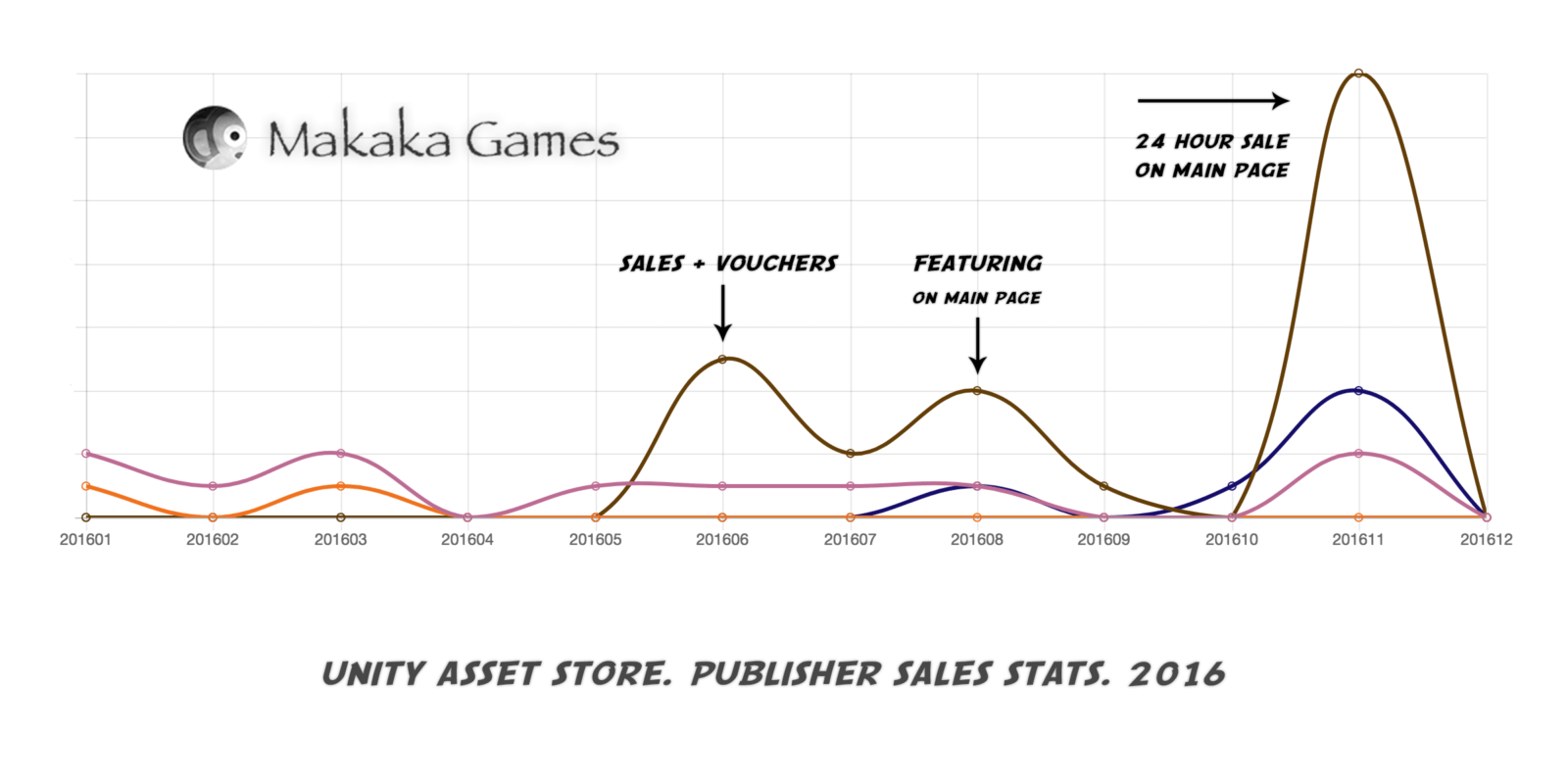
If you give vouchers to your friends and your friends redeem these vouchers, then the number of product downloads increases and your assets will rank higher in Asset Store categories, the main page and search results.
It attracts additional attention to your Unity Assets and as a result increases publisher sales.
Featuring on the Main Page causes more trust from users, and they more willingly buy your assets.
It is not necessary that your product be very popular having amazing revenue to get into promotion from the Unity. It is enough to create something unique and cool, and also publish it to Unity Discussions (Community Showcases) — this will increase the chances of being noticed by the Asset Store Team.
2-Week Sale and Global World Events
The Unity Asset Store sometimes conducts seasonal or monthly sale events. You must participate in each of them with maximum discounts because you will get more sales. When I set the maximum discounts, I get the maximum profit.
Global World Events or News in your niche like releases of ARCore or ARKit affect the market and Unity Asset Store Sales Figures of your Unity Assets (example: my AR Bundle). People need time to learn new technology and draw conclusions later.
Any seasonal sale like $2+, Mega Bundle, Birthday Bonanza, Cyber Week, or Black Friday increases publisher sales. The Main Advice I always give to Publishers is this: If you’re invited to a sale — agree to participate.
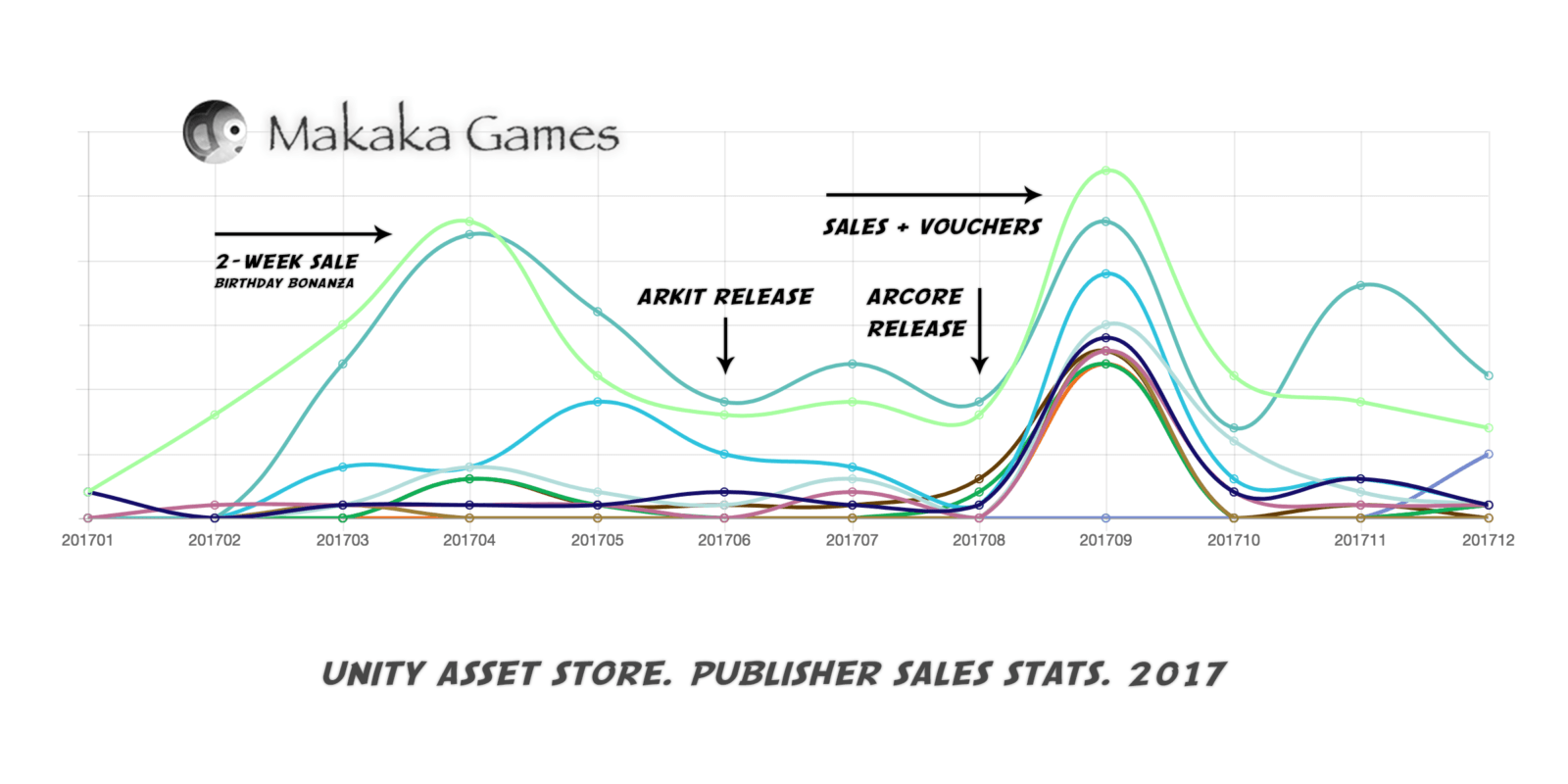
The Unity Asset Store is a better platform than any social media. There are Many Examples of Publishers who don’t post on social media at all — or do so very rarely — yet still achieve great results simply by having HQ products that consistently participate in sales.

Personal Sales and New Assets
Previously, in the Unity Submission Guidelines, there was a point 4.2 that regulated Personal Sales, but is absent for now. However, there is a separate official article about personal sales as well as specialized laws in different countries that may affect this.
If we summarize them, we can distinguish the following common rules of good form — this is not a legal recommendation. You can make Personal Sale for each Unity Asset:
- Personal sales cannot last longer than a two-week period.
- Sale periods should be separated by at least 2 months.
- Details of your sale must be provided in your description text. The sale period and regular price must be mentioned.
Personal sales work well If there is a time limit as well as a personal promo campaign on Social Media.
If you are constantly releasing new assets, it also has a positive effect on your Asset Store Sales Data. Especially if these are products of the same niche and are interconnected (so you can make Bundles).
New Release Discount (Launch Discount)
When you Publish an Asset on the Unity Asset Store, you have the Only Chance to set an Initial Discount that called “Launch Discount”.
New Release Discounts allow all new asset packages to be discounted automatically at launch and can be applied to any new asset priced $15 or more:
- Launch Discounts can be: 10%, 30% or 50%.
- Sales Period can be: 1 or 2 weeks.
Next, the price of your discounted asset cannot be decreased for six weeks following the sale’s end.

Participating in the New Release Discount will – on average – bring in more revenue for an asset than not participating.
Over time, the benefits will diminish.
Official Global Analytics by Asset Store Team


Where your asset will appear:
- Main Page contains “New Release Discounts” section.
- Search has a “New release discount” filter.
Asset will get the next badges:
- “New Release”
- “50%”, “30%” or “10%”
So this is a useful marketing technique to improve your business deals.
Changing Name of Asset
You can Change the Name of Asset periodically. This can drive pageviews in the Asset Store.

How can I include my assets in an Asset Store Sale?
The Asset Store team can send the invite to you for the target sale. You can agree. You can’t influence this directly, unfortunately. But you can support your asset for the best.
Each sale is unique and will have different criteria. In general, the list below will increase the chances any given asset is invited to participate in a sale:
- It has a Unique value proposition.
- It will appeal to a broad audience.
- The price is $20 or higher.
- It has a 4-5 star rating and good recent reviews, or the publisher is actively responding to negative reviews with replies and updates.
- The marketing material and description are appealing.
- Non-sale revenue in the prior time frame is high.
- On sale performance in the relatively recent past has been high.
- It has no paid dependencies.
Not “checking off” these boxes does not exclude an asset from invitation, but it will decrease the likelihood.
AI — Artificial Intelligence vs. Unity Asset Store
Every Year, I observe changes in the Unity Asset Store related to:
- Search Experience,
- UX,
- stricter requirements for products you release for other game devs,
- the growing number of assets,
- external factors like AI pressure that affect revenue,
- and so on.
Personal results may vary significantly.
To evaluate the situation in the Store, we have two types of stats that can be found in the private section for publishers on Unity Discussions:
- Official Tastes & Trends Survey Results (private).
- A topic called Here’s about getting rich from assets (private), where publishers share their outcomes.
According to the survey (2025) among users, those who use AI stated that they ended up spending more on the Asset Store as a result of using AI.

At the same time this definitely correlates with what Unity’s CEO said about Unity’s Vector AI (an ad solution that connects games with the right players) and its customers:
The more effective we are (Unity), the more money they (GameDevs/Publishers) spend.
Matthew Bromberg (President and CEO of Unity)
And It’s a great recognition of the value that Unity is delivering to the game industry.
With the help of AI, you can make games faster, but AI tools are NOT a Panacea in terms of GameDev — they are Helpers. As a result, people spend more money on the UAS to ship more games, because they need:
- Quality.
- Testing.
- Diversity.
- Predictability.
All of these powerful pillars can be accomplished only after processing the results of AI by experienced Developers, 3D Artists, Music/SFX Composers, and other amazing creators.
People also visit UAS for Inspiration.
The mentioned topic also shows that there is still life and success on the Asset Store. On the other hand, I can observe examples in local communities where publishers face significantly reduced income.
This experience is not unique to the UAS: 2025 Steam data shows that 40% of games failed to make even $100, which is the amount developers pay Valve to list a game on the platform.
At the same time, we have examples of Games and Apps like the following that people want to promote of their own free will:
- “Paddle Paddle Paddle” — you and your friend (via multiplayer mechanics) must paddle your way through lava and water, swinging axes, weird wind, and cool slopes — Made With Unity.

- “SlapMac” — Slap your MacBook. It screams back. That’s it. That’s the app.

They are viral and fun. You don’t need cool graphics in games or long-term application development.
This is how success is achieved by those who do things that people need at a given time: simplicity and joy. That’s all. Especially for Indie Game Dev or Asset Publishing.
Example: Publisher Leaving Unity Asset Store
The publisher of the popular Doozy UI Manager (a set of systems that makes it easy for anyone to design, manage, and animate modern user interfaces) left the Asset Store because the logic of showcasing products in the Asset Store changed.
Views were reduced for popular publishers and redistributed among a larger number of publishers. And this happened even before the AI era.
Of course, it would be better to have something besides the Asset Store for the Developer to be sustainable. But on the other side, it shows that you need to increase your marketing efforts for your assets outside the store, because Unity is interested in showcasing diverse and needed products today more than ever in the search results.
The more sales you have, the more people need this product, and the more the store will promote it in the native search.
Some Products Can Lose Popularity
Every Product has its Own Life Cycle. Sometimes, a Specific Product is No Longer Needed on the Market. It’s neither Good nor Bad — it’s Just Business. When your asset is out of fashion, like mobile AR, no promotion will save it — some products just reach the end of their popularity one day.
Historically, September has been the worst month of the year for My Unity Assets. However, I don’t remember having zero revenue since 2017. In 2026, All Assets were updated to Unity 6.3 LTS and URP, and generated some revenue during a popular “$2+ Sale” in May and June as it shown in the Events section.
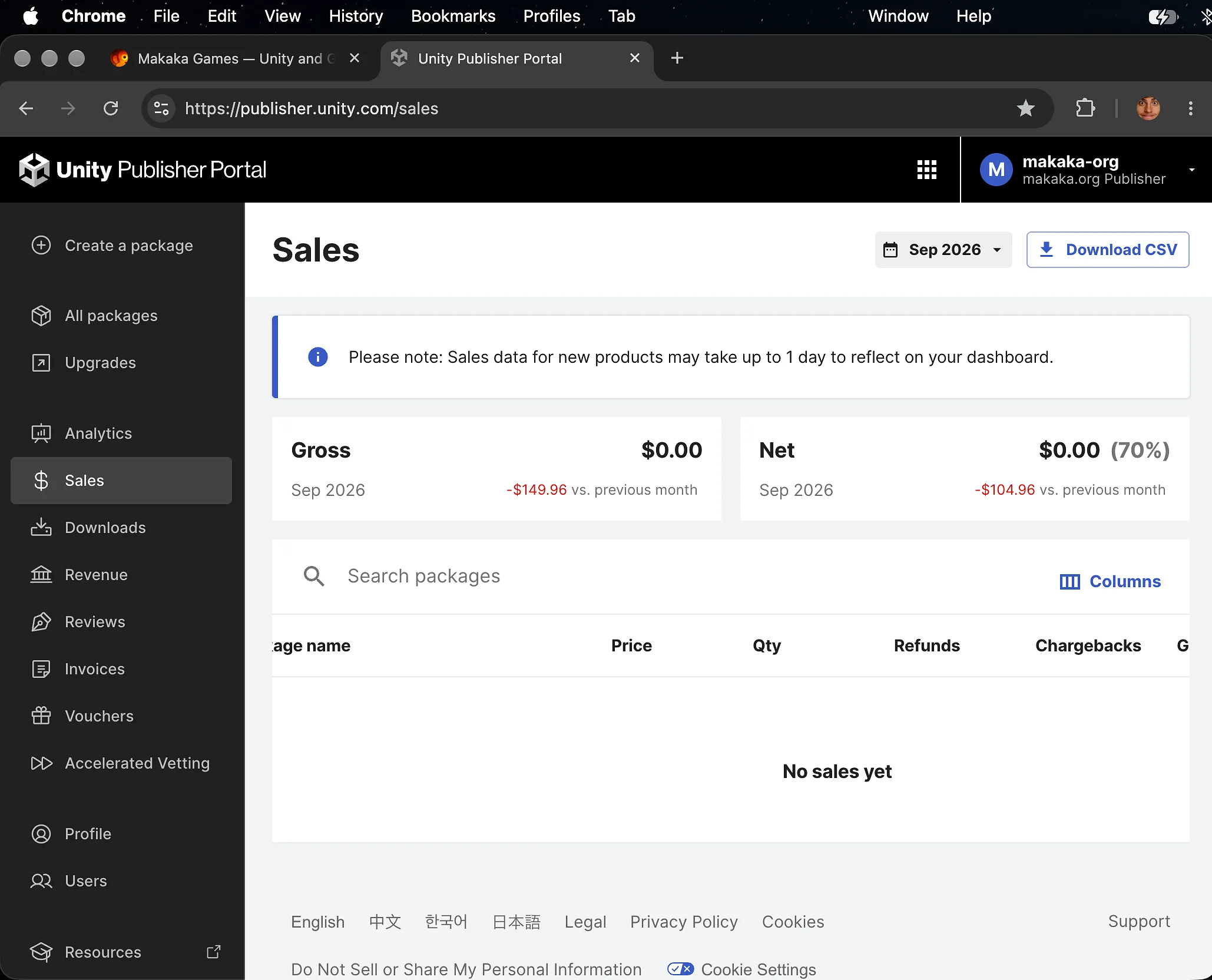
But AI and the Crisis in the Development Industry are doing their best job. Publishing on FAB (additionally to UAS) didn’t solve the key issue either (and some other Asset Publishers say the same).
Probably the only reasonable solution would be to significantly reduce the prices to a symbolic amount, because I’ve tested many variants over the years, but not symbolic ones, starting from $4.99 — the minimal price that the Asset Store allows.
I’ve been an Indie Developer since 2017, and it’s always been a compromise in which areas I should focus my efforts while diversifying my risks, so now I provide Promotion Services (Advertising, Marketing, Developer Advocacy).
Unity Asset Store Tools
Submission Guidelines & Package Uploader
- Unity Submission Guidelines contains all the rules you must follow to publish a Unity Asset.
- To upload a Package to the Publisher Portal you need the Asset Store Publishing Tools.

Free Assets for Demo Purposes
There are several ways to use Free Unity Assets in Your Own Asset on Asset Store.

Assets by Unity
These Assets by Unity are allowed to be incorporated into submitted assets for demonstration purposes. To avoid needless file size, Unity requires that you only include the content that is directly being utilized.

Assets on GitHub with Unity Package Manager support
Free Assets from GitHub with the support of Package Manager can be used this way, as I use them in my assets like AR FPS Shooter. So you can’t include them, but you can write a manual on how to import them correctly.
Package Dependencies section
The Asset Store provides a “Package Dependencies” section on the Asset Pages. With this section, you can indicate the links for both Free And Paid assets that are used inside your project, but you cannot include them in your asset. So, optionally, you need to write a manual on how to import them as well.
Poly Haven Asset Library
Use polyhaven.com with the opportunity to redistribute assets as you want without giving a credit or attribution due to the CC0 license.

Publisher Window (README)
The Unity Publisher Window (README-file) is a welcome screen where the user can learn all the important information about the Product (Unity Asset or Project) and Company by visiting important links.
The Welcome Screen is automatically opened when you import a new Unity Package or when you open a Unity Project for the first time.

This is a modified version of the readme that is included in the Default Unity Project. Every my Unity Asset is imported with it and replaces the default readme stuff when it exists.
Links in Window by Default:
Pay attention to your competitors, but pay more attention to what you’re doing. Do more than others expect from you.
There is one extremely simple idea: if I do not tell about myself, then no one will tell about me. Publisher Window is an asset for the Unity Editor, which emphasizes the spread and openness of the brand.
It is intended to improve the quality of my products from all sides, and in particular, openness, serving, and decorations.
That is, I want to give customers the opportunity to get support and all information about the product and brand after they have downloaded the asset and closed the Unity Asset Store.
This stage is a bottleneck. There is a certain percentage of customers (3-10%), who faced with the first problems (independent of the product), rush to put a bad review in the store without reading the documentation and without contacting me for the support that regularly I give.
It is at this stage that I want to increase the percentage of customers’ satisfaction with my products, making them truly happy with the Publisher Window.
If you have any issues with the first launch then just Reach Support with Invoice Number and Get Help.
If you read this tutorial from PDF, first check the latest docs online to get actual information.
Download Unity Asset on Publisher Portal and Test
When you publish your Unity Asset, you need to make sure that your product is installed correctly at the first download by your client. It’s Especially relevant for Complete Projects or Plugins in which Project Settings play a crucial role.
You can download the Unity Package from the Package Draft on Publisher Portal:
All Packages > Draft > Your Package > Package upload > Uploading Menu (3 Dots) > Download.

Support
First, read the latest docs online.
If it didn’t help, get the support:
How can a Unity Publisher keep customers happy, provide excellent support for Unity assets, and maintain fast response times in customer service?
The question is a kind of challenge for every Asset Store Publisher.
Have questions? Contact the Publisher!
Because of the specifics of the business, my clients contact me for the most part in case of any problems. If there are no problems, then Unity Publisher doesn’t know practically anything about the buyer, except for impersonal data from Asset Store Analytics.
After receiving a support request, I provide a response within 5 business days. Of course, 5 working days is not excellent for a company. But this is an adequate time for solving almost any technical issue, without prejudice to the development of new products. I don’t have employees, and I provide support personally (therefore 5 business days, not 15 minutes).
I can help you only if you contact me and send some test data, which is indicated on the support page.
If you did not find your case in the documentation, then this is the only way. So stay in touch: Let’s solve your issues and make the world a little happier.
People want to be happy by solving their problems with your Unity Assets. Make them happy much earlier with the help of your support.
I can also respond earlier than the problem will be solved, indicating to the client that I’m already dealing with the issue and already know which direction to look in. It causes trust and also endears the client for further requests to leave positive feedback in the Asset Store.
The UI of Publisher Profile on Asset Store says for users that the main communication channels between publisher and customers are Email and Website.
You can also receive support requests on Social Media you manage. So, set up email notifications from them to respond timely. All support channels are indicated in the description of each Unity Asset. So, I create all the conditions for the client to get support before leaving a comment in the Asset Store.
You can set up an Autoresponder in the email. It sends a response immediately to any first email from the customer in a new conversation or a series of emails.
People often forget to send an Invoice Number to confirm their purchase. You can remind them about it in an automated email answer. It saves your time and customer time.
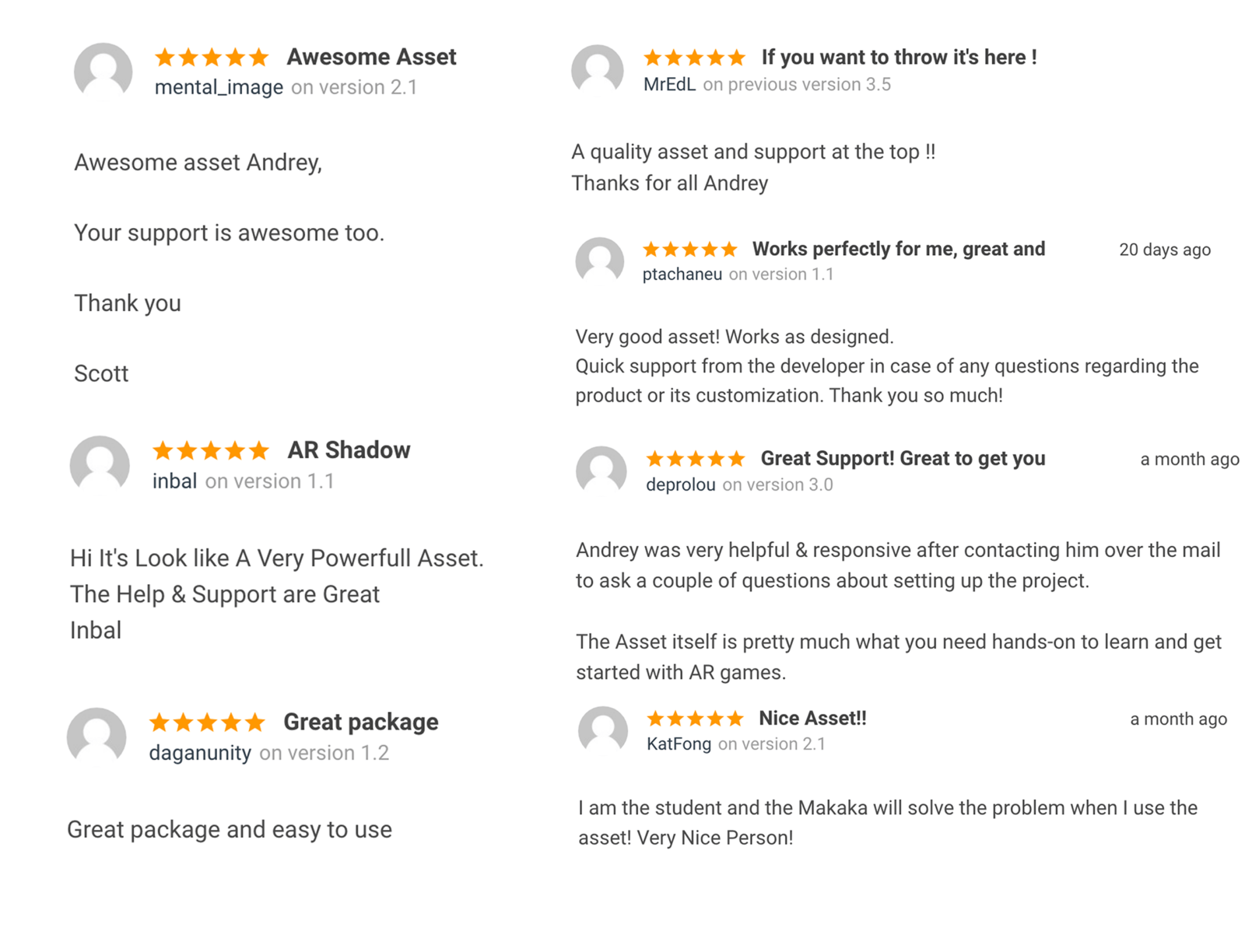
Awesome Feedback to Best Customer Service
If I respond in a timely manner, most customers remain neutral to the request for leaving a review in the Unity Asset Store. But if I react earlier (e.g., per day) and send a ready-made archive, the client will be more than satisfied and leave big feedback in the store.
So for Eugenio Gatto from the LA Group, I’ve developed the Vuforia version of my app template for Unity with the augmented reality called AR Basketball (docs).

Reaction Speed doesn’t work
Of course, there are times when the declared reaction speed does not work.
Unfortunately, there is much of such cases.
Why? Some customers do not want help. Really!
They write their problems right on the Unity Asset Store and then don’t respond to me.
Support is working for users, just contact support and the product will work.
What’s the matter?
There are plenty of reasons why a purchased Unity asset might fail to work on the first run, especially when it comes to mobile development with third-party frameworks:
- Unity Version;
- Version of third-party framework (e.g., Native Gallery);
- iOS/Android version;
- Failure to follow the installation procedure described in the tutorial in PDF or on the Website;
- Other reasons.
All of this — software from different manufacturers, which can contain many bugs.
I write down all known cases in the documentation, but I can’t predict everything.
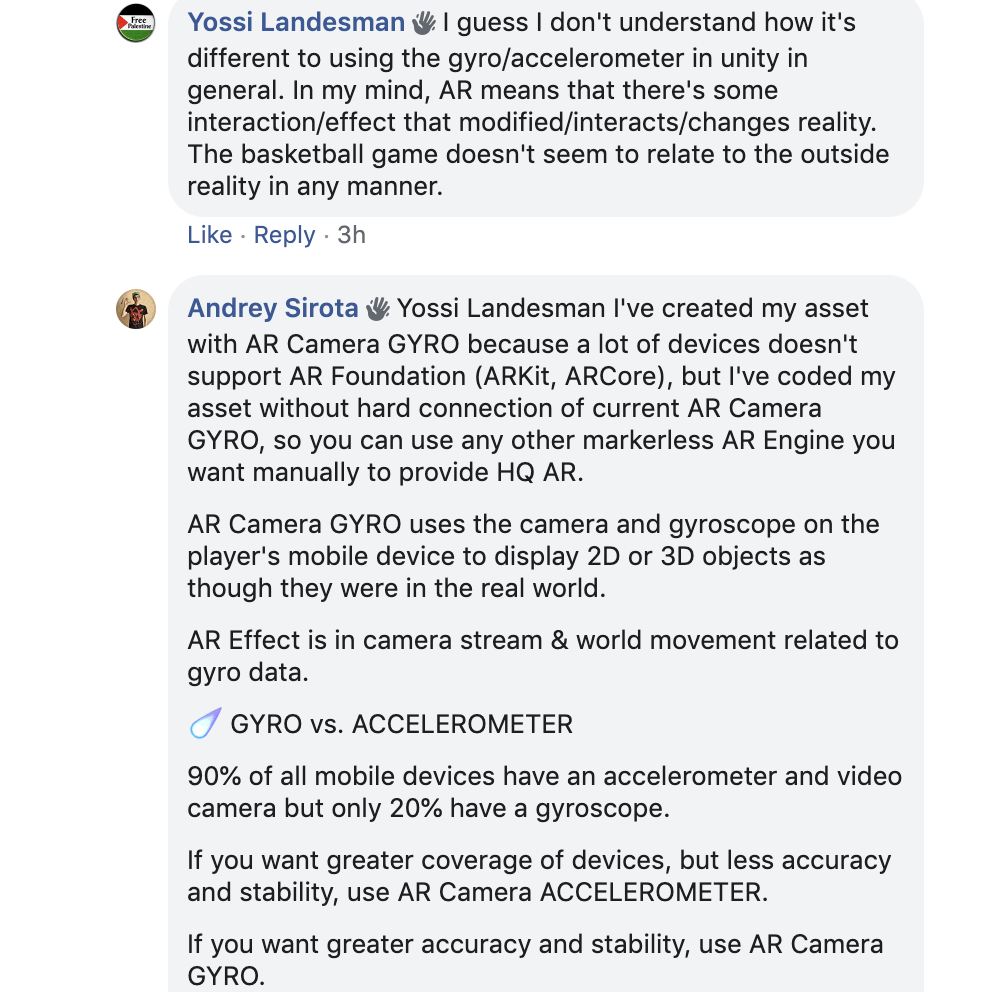
Love and Patience for Every Unity Developer
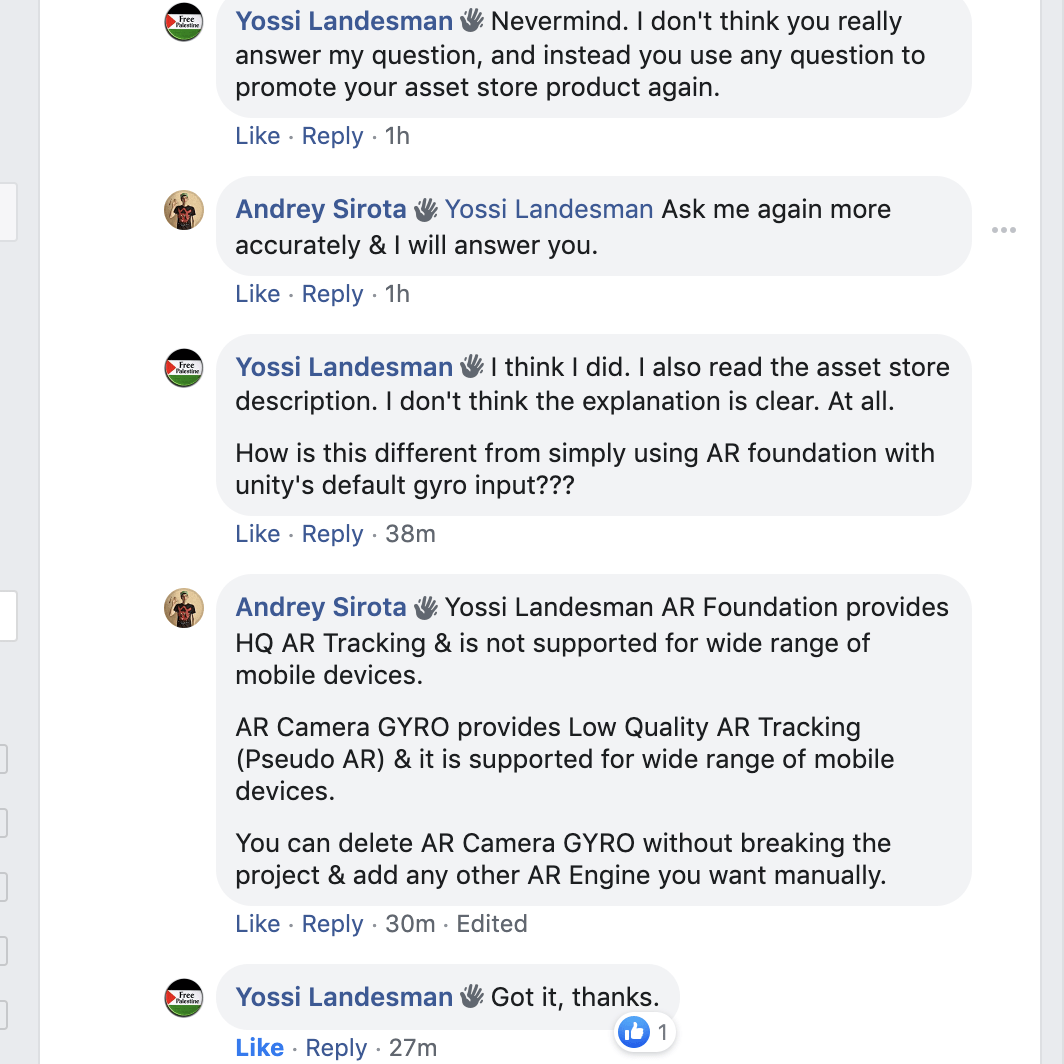
Here, a developer wanted to know which AR Engine was used in the previous version of Unity Asset called AR Basketball (docs) and what the difference is between AR Camera Lite (docs) and Unity Package called AR Foundation.
I’ve answered as many times as needed, with additional info and clarifications.

New Purchase Instead of a Refund
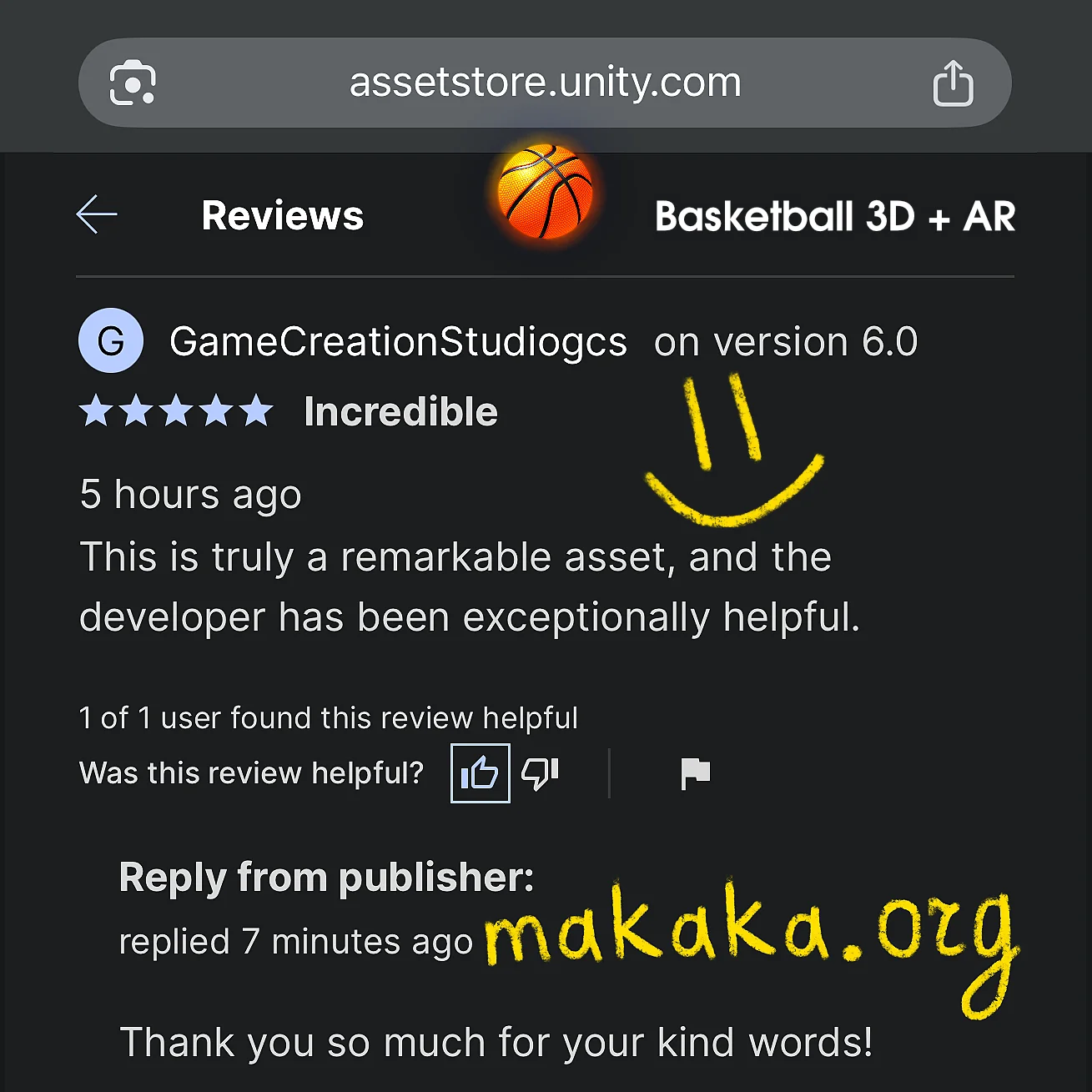
This Developer Wanted to Refund My Basketball Unity Asset but I Suggested a Deal: I set special upgrade prices from Throw Control to FPS Basketball with 2 options, so the Developer could upgrade without losing the money already spent.
Why the Confusion?
Once an Asset has been Downloaded, I cannot provide a refund simply because the wrong asset was purchased. Throw Control is part of the Basketball Game template, and it contains Video Demos showing All its Use Cases. The Developer thought the Basketball Game was included as well.
I would also like to Clarify a Few Points:
- Assets always include Videos covering Different Use Cases. The YouTube Title of Each Video Demo Indicates the Specific Asset it belongs to.
- Every One of My Assets includes a Map of Assets link in the Description, helping you choose the asset that best fits your needs.
- Every Asset also has a “Package Contains” section in its Description. Throw Control does not list a Basketball Scene as part of the package.
- Every Review is a Hard Challenge. However, there is Always a Way that Can Lead to a Positive Outcome.
FAQ
How do I publish a Unity Package?
To get Access to Unity Publisher Portal, you need to have your own website with examples of Projects Made with Unity. This requirement helps the game industry weed out inexperienced Unity Users. More Information you can find here.
Can you publish a game with Unity Assets?
Yes, You Can Publish a Game as a Complete Product on every App Store you want. You can’t redistribute assets on marketplaces like Envato or Unity Asset Store with or without modifications.
Can you make money on the Unity Asset Store?
Yes, You Can. There are both large companies, like Synty Studios, and indie publishers, like Makaka Games. Moreover, if your asset pretends to become a part of the Development Pipeline, then Unity can buy you (example: TextMesh Pro).
How do you sell music on the Unity Asset Store?
You can sell Music, Sound FX, Voice, Songs — any audio files. But the Asset Store platform provides unlimited use of your Audio Content in Complete Products: Games, Videos, Apps, etc… For Example, On Envato Market, you need to buy a separate license for Every Video/Series for YouTube, and the Unity Asset Store doesn’t contain this limitation.
You can find full information about using the Unity Asset Store in the official documentation:
Asset Store Terms of Service and EULA.